設計・実装・複数AIレビューを1文で回す dev-orchestra を公開してみた I Released dev-orchestra: Design, Implementation, and Multi-AI Review from a Single Request
はじめに
前回は、dev-orchestra を作った経緯を書きました。 今回は、これが何をするもので、どんな人に向いているのかを紹介します。
- GitHub: istb16/dev-orchestra(MIT、1.0.0)
- 動く場所: Claude Code / Codex / Antigravity のプラグインとして
この連載では、このあと Claude Code・Codex・Antigravity それぞれでの使い方や、設定の詳しい話を順に書いていきます。この記事はその入口です。
一言でいうと
1 文の依頼から、設計 → 実装 → テスト → 複数の AI による独立したレビュー → 指摘の仕分け → 修正 → 再テストまでを回すプラグインです。
この issue を設定済みのワークフローで実装してと話しかけると、dev-orchestra が依頼に必要な工程だけを選んで、順番に AI へ割り振ります。
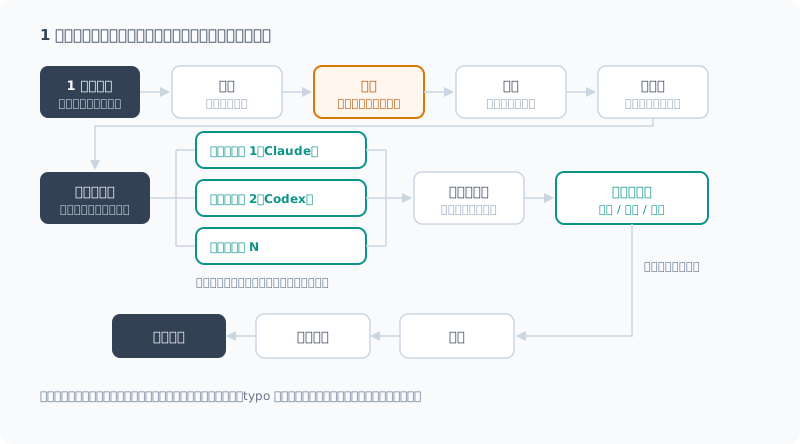
| 工程 | 担当 | ポイント |
|---|---|---|
| 設計 | architect | 調べて計画を書く。読み取り専用で、あなたが承認するまで実装に進まない |
| 実装 | implementer | 計画からコードとテストを書く |
| レビュー | reviewers | 2 つ以上の AI が、凍結した同じ差分を、互いの結果を見ずに読む |
| トリアージ | orchestrator | 重複をまとめ、指摘を採用・却下・重複に仕分ける |
| 修正 | review_fixer | 採用した指摘だけを直す |
typo の修正なら編集だけ、スキーマの変更なら全部、というように、動く工程は依頼の大きさで変わります。
なぜ別の AI にレビューさせるのか
AI は、自分が書いたコードのレビューが苦手です。 バグを生んだ思い込みを、レビューするときもそのまま持っているからです。
互いの意見を知らない状態で同じ差分を見た別々の AI は、ときどき意見が食い違います。 その食い違いが、本物のバグのありかになります。
もう 1 つ大事なのが、レビュー結果をそのまま修正に回さないことです。 複数の AI の指摘は重複しますし、的外れなものも混ざります。全部を「直して」と渡すと、要らない変更が量産されます。 そこで dev-orchestra は、指摘を機械的にまとめたうえでトリアージし、採用したものだけを修正役に渡します。
公式の codex-plugin-cc との違い
「Claude Code から Codex にレビューさせる」だけなら、OpenAI 公式の codex-plugin-cc があります。 手軽さでは向こうが上なので、違いを正直に並べます。
| codex-plugin-cc | dev-orchestra | |
|---|---|---|
| 提供 | OpenAI 公式 | 個人の OSS |
| 動く場所 | Claude Code | Claude Code / Codex / Antigravity |
| レビューする AI | Codex | 2 つ以上を並列(Claude / Codex / 自作。Antigravity は限定対応) |
| 扱う範囲 | レビューと、Codex への作業の委任 | 設計からレビュー・修正・再テストまで通しで |
| 指摘の扱い | 結果を Claude Code に返す。任意の review gate を有効にすると、問題があれば Claude に対応させる | 重複統合 → トリアージ → 採用分だけ修正 |
| 始めやすさ | スラッシュコマンドですぐ使える | 最初にプリセットを選ぶ |
| 便利な機能 | バックグラウンド実行、狙いを指定する批判的レビュー、Codex への会話の引き継ぎ | 計画の承認、レビューの往復の上限、トークンの記録 |
公式プラグインの review gate は、/codex:setup --enable-review-gate で有効にできます。
Claude が応答を終えようとすると Codex がレビューし、問題が見つかれば終了を止めて、Claude に先に直させます。自動でレビューして直させるだけなら、これでも十分です。
README には、review gate は往復が続いて利用枠を使い切るおそれがある、という注意があります。
違いは、レビュアーの数と指摘の扱いです。review gate のレビュアーは Codex 1 つです。dev-orchestra は複数のレビュアーの指摘を突き合わせ、重複をまとめてトリアージし、採用したものだけを直します。
使い分けの目安はこうです。
- Claude Code での作業に、Codex のセカンドオピニオンを 1 つ足したい → codex-plugin-cc
- 開発の流れ全体を、複数の AI で回したい → dev-orchestra
対応している CLI
dev-orchestra は、手元に入っている AI の CLI をそのまま使います。API キーは要りません(各 CLI のログインを使います)。
| Claude Code | Codex | Antigravity | |
|---|---|---|---|
| プラグインとして入れる | ○ | ○ | ○(リンクで導入、再起動が必要) |
| 実装・修正の役 | ○ | ○ | ○(テストを走らせるには設定が要る) |
| 設計・レビューの役 | ○ 読み取り専用を CLI が強制 | ○ 読み取り専用のサンドボックス | △ 読み取り専用を強制できないので、警告付きの限定対応 |
| 設計の続きから再開 | ○ | ○ | × |
Claude Code と Codex は全部の役をこなせます。 Antigravity は実装・修正向けで、設計やレビューに置くこともできますが、ファイルを書き換えられる状態で動くことになります。 くわしい違いは、それぞれの使い方の回で書きます。
Claude Code だけでも使う意味はあるか
「複数の AI」と言われると、Claude Code しか使っていない人には関係なさそうに見えます。 でも、Claude Code だけでも使う意味はあります。
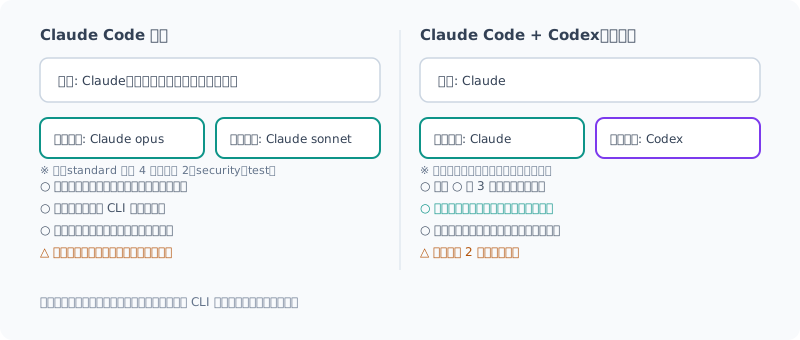
| Claude Code だけでも得られること | なぜ効くか |
|---|---|
| レビュアーは別プロセスで、実装したときの会話を持ち込まない | 「さっき自分でこう決めた」という前提なしにコードを読める |
| 読み取り専用を CLI が強制する | 「書き換えないで」とお願いするだけでは守られないことがある |
| 役割ごとにモデルを分けられる | 設計は強いモデル、安く済ませたいレビューは軽いモデル、と費用をかけ分けられる |
| トリアージで採用した指摘だけを直す | 要らない修正が入らない |
必要な工程だけ動き、記録が .ai/ に残る | 小さな依頼は軽く、大きな依頼は計画やレビューを後から読み返せる |
プリセットを選ぶと、そのマシンに入っている CLI に合わせて構成が決まります。Claude Code しか入っていなければ、レビュアーも Claude だけで組まれます。
とはいえ、いちばん効くのは別ベンダーの AI を混ぜたときです。同じ系列のモデルどうしは、思い込みも似やすいからです。 Codex も使える人は、ぜひ 2 社構成で試してみてください。
メリットとデメリット
| メリット | デメリット |
|---|---|
| 自分では気づけないバグが見つかる | 実行時間とトークン消費が増える(AI を何度も呼ぶため) |
| 運び屋の作業(コピペと待機)がなくなる | 指摘のトリアージは要る(オーケストレーターがやるが、最後に確認するのはあなた) |
| 要らない修正が入らない | レビュアーが読んだコードが、登録した各ベンダーに送られる(差分だけとは限らない) |
| 計画やレビューの記録が残る | 最初にプリセットを選ぶなど、導入の手間が少しある |
特に 3 つ目のデメリットは気にしておいてください。 Claude と Codex でレビューすれば、コードは Anthropic と OpenAI の両方に送られます。
送られるのは差分だけではありません。レビュアーは差分のまわりを調べるために、リポジトリ内のファイルを読めます。読み取り専用でも、Claude でも Codex でも、.env のようなファイルまで読めます。しかも Claude の場合は、自分で書いた permissions.deny もレビュアーには効きません。理由と対策(ルールを managed settings に移す)は、次の Claude Code の回で書きます。
外に出せないコードを扱うなら、ローカル LLM だけでレビューを組むこともできます。
ただしそのときは、Claude Code などのクラウドの AI から dev-orchestra を呼ばないでください。呼び出し元の AI 自身がコードを読むので、そこからクラウドに出ていきます。ターミナルから直接実行し、--only でレビュアーをローカル LLM に絞ります。くわしくは以前の記事に書きました。
トークンの消費を抑える仕組み(小さな変更はレビュアーを減らす、2 回目のレビューは修正分だけ、など)は入っていますが、1 つの AI で済ませるよりは確実に増えます。まずは小さな依頼から試すのがおすすめです。
使い方
インストールは Claude Code なら 2 行です。
claude plugin marketplace add istb16/dev-orchestra
claude plugin install dev-orchestra@dev-orchestra
Codex や Antigravity での入れ方、初期設定、各コマンドの説明は、GitHub のドキュメントにまとめています。最新の情報はこちらが正です。
- README(日本語) — インストール、初期セットアップ、使い方
- ワークフロー — 各工程で何をするか、ワークフローの例
- 設定 — プリセット、モデル、レビュアーの組み方
まとめ
- dev-orchestra は、1 文の依頼から設計・実装・複数 AI のレビュー・修正までを回すプラグイン
- レビュアーは凍結した同じ差分を、読み取り専用で、互いを見ずに読む。指摘はトリアージして採用分だけ直す
- Codex のセカンドオピニオンを 1 つ足すなら公式の codex-plugin-cc、開発の流れ全体を回すなら dev-orchestra
- Claude Code と Codex は全部の役、Antigravity は実装・修正向け(設計・レビューは限定対応)
- Claude Code だけでも、別プロセスのレビューとトリアージで意味がある。いちばん効くのは別ベンダーを混ぜたとき
- デメリットは時間とトークン、そしてコードが各ベンダーに送られること。レビュアーは差分以外のファイルも読める
- 機密のコードは、ターミナルから直接、ローカル LLM だけでレビューする
次回からは、Claude Code・Codex・Antigravity それぞれで実際に使ってみます。
English version
Introduction
Last time (in Japanese), I wrote about why I built dev-orchestra. This time I’ll introduce what it does and who it’s for.
- GitHub: istb16/dev-orchestra (MIT, 1.0.0)
- Where it runs: as a plugin for Claude Code / Codex / Antigravity
Later in this series, I’ll cover how to use it in Claude Code, Codex, and Antigravity, and go into the configuration in detail. This post is the entry point.
In a Nutshell
It’s a plugin that takes a single-sentence request and runs design → implementation → testing → independent reviews by multiple AIs → triage of the findings → fixes → re-testing.
Implement this issue with the configured workflowSay that, and dev-orchestra picks only the steps the request needs and hands them to the AIs in order.
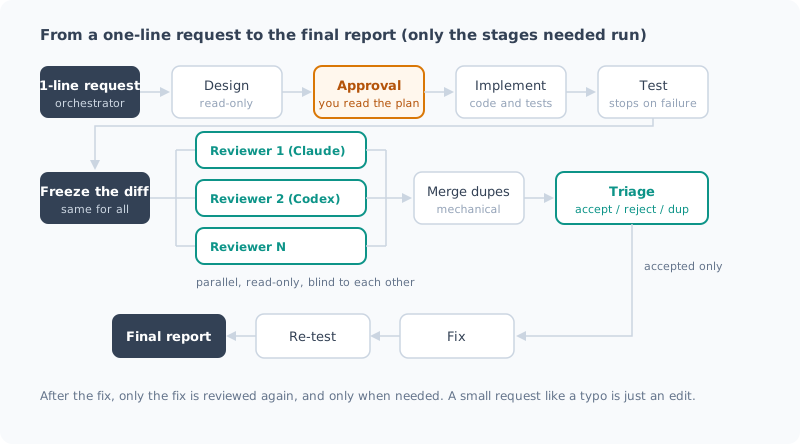
| Step | Role | Key point |
|---|---|---|
| Design | architect | Investigates and writes a plan. Read-only, and doesn’t move on to implementation until you approve |
| Implementation | implementer | Writes code and tests from the plan |
| Review | reviewers | Two or more AIs read the same frozen diff without seeing each other’s results |
| Triage | orchestrator | Merges duplicates and sorts findings into accepted, rejected, and duplicate |
| Fix | review_fixer | Fixes only the accepted findings |
A typo fix gets just an edit, a schema change gets everything: which steps run depends on the size of the request.
Why Have a Different AI Review the Code?
AI is bad at reviewing code it wrote itself. The assumptions that produced the bug are still there when it reviews.
Separate AIs looking at the same diff without knowing each other’s opinions sometimes disagree. That disagreement is where the real bugs are.
Another important point is not passing review results straight to the fixer. Findings from multiple AIs overlap, and some miss the mark. Hand all of them over with “fix these,” and you get a pile of unnecessary changes. So dev-orchestra mechanically merges the findings, triages them, and passes only the accepted ones to the fixer.
How It Differs from the Official codex-plugin-cc
If all you want is “have Codex review from Claude Code,” there’s OpenAI’s official codex-plugin-cc. It wins on ease of use, so here’s an honest comparison.
| codex-plugin-cc | dev-orchestra | |
|---|---|---|
| Provided by | OpenAI (official) | Individual OSS |
| Runs on | Claude Code | Claude Code / Codex / Antigravity |
| Reviewing AI | Codex | Two or more in parallel (Claude / Codex / custom. Antigravity has limited support) |
| Scope | Review, and delegating tasks to Codex | End to end, from design through review, fixes, and re-testing |
| Handling findings | Returns results to Claude Code. With the optional review gate enabled, Claude has to address any problems | Merge duplicates → triage → fix only the accepted ones |
| Getting started | Ready to use via slash commands | Pick a preset first |
| Handy features | Background runs, adversarial reviews with a focus you specify, handing the conversation off to Codex | Plan approval, a cap on review rounds, token logging |
The official plugin’s review gate can be enabled with /codex:setup --enable-review-gate.
When Claude is about to finish its response, Codex reviews it, and if it finds problems, it blocks the finish and makes Claude fix them first. If you just want automatic review and fixes, this is enough.
The README warns that the review gate can keep looping and use up your usage limits.
The difference is the number of reviewers and how findings are handled. The review gate has a single reviewer, Codex. dev-orchestra cross-checks findings from multiple reviewers, merges duplicates, triages them, and fixes only the accepted ones.
Here’s a rough guide for choosing:
- You want to add one Codex second opinion to your Claude Code work → codex-plugin-cc
- You want to run the whole development flow with multiple AIs → dev-orchestra
Supported CLIs
dev-orchestra uses the AI CLIs you already have installed. No API keys are needed (it uses each CLI’s login).
| Claude Code | Codex | Antigravity | |
|---|---|---|---|
| Install as a plugin | Yes | Yes | Yes (installed via a link, restart required) |
| Implementation / fix roles | Yes | Yes | Yes (running tests needs configuration) |
| Design / review roles | Yes read-only enforced by the CLI | Yes read-only sandbox | Partly read-only can’t be enforced, so limited support with a warning |
| Resume from where design left off | Yes | Yes | No |
Claude Code and Codex can handle every role. Antigravity is meant for implementation and fixes; you can put it in design or review, but it will run with the ability to modify files. I’ll cover the differences in detail in the post on each tool.
Is It Worth Using with Claude Code Alone?
“Multiple AIs” might sound irrelevant if you only use Claude Code. But it’s worth using even with Claude Code alone.
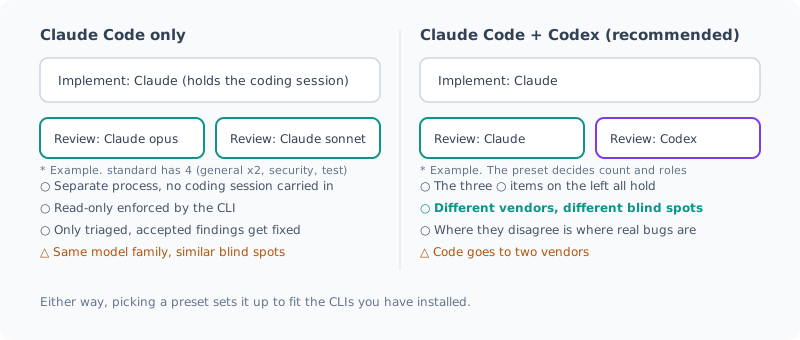
| What you get even with Claude Code alone | Why it helps |
|---|---|
| Reviewers run in a separate process and don’t carry over the conversation from implementation | They read the code without the premise of “I decided this myself a moment ago” |
| The CLI enforces read-only | Just asking “don’t modify anything” isn’t always respected |
| You can assign a different model to each role | Spend where it matters: a strong model for design, a lighter one for reviews you want to keep cheap |
| Triage means only accepted findings get fixed | No unnecessary fixes slip in |
Only the needed steps run, and records are kept in .ai/ | Small requests stay light, and for big ones you can reread the plan and reviews later |
When you pick a preset, the setup is decided based on the CLIs installed on that machine. If only Claude Code is installed, the reviewers are all Claude too.
That said, it works best when you mix in an AI from a different vendor. Models from the same family tend to share the same assumptions. If you can also use Codex, I recommend trying a two-vendor setup.
Pros and Cons
| Pros | Cons |
|---|---|
| Finds bugs you wouldn’t notice yourself | More run time and token usage (because it calls AIs many times) |
| No more courier work (copy-pasting and waiting) | Findings still need triage (the orchestrator does it, but you do the final check) |
| No unnecessary fixes slip in | Code the reviewers read is sent to each vendor you registered (not necessarily just the diff) |
| Plans and reviews are kept on record | Some setup effort, such as picking a preset first |
Keep the third con in mind in particular. If you review with Claude and Codex, your code is sent to both Anthropic and OpenAI.
It’s not just the diff. To investigate around the diff, reviewers can read files in the repository. Even in read-only mode, both Claude and Codex can read files like .env. On top of that, with Claude, the permissions.deny rules you wrote don’t apply to reviewers either. I’ll cover why and what to do about it (move the rules to managed settings) in the upcoming Claude Code post.
If you work with code that can’t leave your environment, you can also set up reviews with local LLMs only.
In that case, though, don’t call dev-orchestra from a cloud AI such as Claude Code. The calling AI reads the code itself, so the code goes out to the cloud from there. Run it directly from the terminal and use --only to limit the reviewers to local LLMs. I wrote about this in detail in an earlier post (in Japanese).
There are mechanisms to keep token usage down (fewer reviewers for small changes, re-reviewing only the fixes the second time, and so on), but it will definitely use more than getting by with a single AI. I recommend starting with small requests.
Usage
On Claude Code, installation takes two lines.
claude plugin marketplace add istb16/dev-orchestra
claude plugin install dev-orchestra@dev-orchestra
How to install on Codex and Antigravity, initial setup, and each command are documented on GitHub. That’s the source of truth for the latest information.
- README — installation, initial setup, usage
- Workflow — what each step does, example workflows
- Configuration — presets, models, how to set up reviewers
Summary
- dev-orchestra is a plugin that runs design, implementation, multi-AI review, and fixes from a single-sentence request
- Reviewers read the same frozen diff, read-only, without seeing each other. Findings are triaged, and only the accepted ones are fixed
- To add one Codex second opinion, use the official codex-plugin-cc; to run the whole development flow, use dev-orchestra
- Claude Code and Codex handle every role; Antigravity is meant for implementation and fixes (limited support for design and review)
- Even with Claude Code alone, separate-process reviews and triage make it worthwhile. It works best when you mix in a different vendor
- The downsides are time and tokens, and your code being sent to each vendor. Reviewers can read files beyond the diff
- For confidential code, review with local LLMs only, directly from the terminal
Starting next time, I’ll actually use it in Claude Code, Codex, and Antigravity.
関連記事 Related Posts
AIに複数レビューさせるのが面倒すぎて、自動で回すプラグインを作ってみた AIに複数レビューさせるのが面倒すぎて、自動で回すプラグインを作ってみた
AIに書かせたコードを別のAIにもレビューさせたい。でも手作業でやると、ターミナル間のコピペと待ち時間で疲れ果てる。それを仕組みにしたプラグイン dev-orchestra の 1.0.0 を出したので、作った経緯と使ってみての感想をまとめました。 AIに書かせたコードを別のAIにもレビューさせたい。でも手作業でやると、ターミナル間のコピペと待ち時間で疲れ果てる。それを仕組みにしたプラグイン dev-orchestra の 1.0.0 を出したので、作った経緯と使ってみての感想をまとめました。
ローカルLLMをdev-orchestraのコードレビュアーに追加してみた ローカルLLMをdev-orchestraのコードレビュアーに追加してみた
自宅PCで動かしているQwenを、複数モデルで独立レビューするdev-orchestraの3枚目のレビュアーとして組み込みました。プロバイダがAPIではなくCLIをラップする設計だったので、薄いCLIを1枚挟んで繋いだ話です。その後の公式対応と、Store版Pythonのパス罠についても追記しました。 自宅PCで動かしているQwenを、複数モデルで独立レビューするdev-orchestraの3枚目のレビュアーとして組み込みました。プロバイダがAPIではなくCLIをラップする設計だったので、薄いCLIを1枚挟んで繋いだ話です。その後の公式対応と、Store版Pythonのパス罠についても追記しました。
機密コードをクラウドに出さずにAIでレビューする(ローカルLLM × dev-orchestra) 機密コードをクラウドに出さずにAIでレビューする(ローカルLLM × dev-orchestra)
社外に出せないコードを、クラウドのAIに送らずにレビューする方法をまとめました。ローカルLLMをdev-orchestraのレビュアーに登録し、機密のものはローカルだけで、公開してよいものはクラウドのAIと併用します。ローカルLLMのレビューの実力と、呼び出し方ひとつでコードが外に出てしまう落とし穴も書きます。 社外に出せないコードを、クラウドのAIに送らずにレビューする方法をまとめました。ローカルLLMをdev-orchestraのレビュアーに登録し、機密のものはローカルだけで、公開してよいものはクラウドのAIと併用します。ローカルLLMのレビューの実力と、呼び出し方ひとつでコードが外に出てしまう落とし穴も書きます。