dev-orchestra のプリセット quality / standard / fast を比べてみた Comparing dev-orchestra's quality / standard / fast presets
はじめに
dev-orchestra を初めて使うと、プリセットを聞かれます。
これまでの回(Claude Code・Codex・Antigravity)では「迷ったら standard」で済ませてきましたが、今回はその中身を比べます。
先に答えを書いておきます。
- 迷ったら
standard。品質と費用のバランス型で、既定値もこれ qualityは、レビュアーを増やして強いモデルを多めに使うfastは、ふだんのレビューを 1 人にして、実装と修正は軽いモデル中心で回す
dev-orchestra 1.0.0 で、3 つのプリセットを Claude Code だけ・Codex だけ・両方の 3 つの環境で実際に展開して確かめました。
dev-orchestra は GitHub で公開しています(MIT ライセンス)。役に立ちそうと思ったら、スターを付けてもらえるとうれしいです。
プリセットは「どこにお金をかけるか」の選択
プリセットは、費用(トークン)の軸での 1 つの選択です。選ぶと、次の 4 つがまとめて決まります。
| 決まるもの | 意味 |
|---|---|
| 役ごとのモデル | 設計・実装・修正などを、どの強さのモデルにやらせるか |
| レビュアーの構成 | 何人で、どの観点(全般・セキュリティ・テストなど)でレビューするか |
| 設計レビュー | 実装の前に、計画そのものもレビューするか |
| 最適化レベル | 小さな変更でレビュアーを減らすなど、どこまでコストを削るか |
そして、そのマシンに入っている CLI に合わせて自動で組み替えられます。Codex が入っていないのに Codex のレビュアーが並んで毎回失敗する、ということは起きません。
手順
1. 役ごとのモデルを比べる
Claude Code が入っているマシンでは、役ごとのモデルはこうなります。
| 役 | quality | standard | fast |
|---|---|---|---|
| 指揮(orchestrator) | opus | sonnet | sonnet |
| 設計(architect) | fable | fable | opus |
| 実装(implementer) | fable | opus | sonnet |
| 修正(review_fixer) | fable | opus | sonnet |
standard は「設計にはいちばん強いモデル、実装と修正は opus」という配分です。設計がずれると後の工程がまるごと無駄になるので、そこにお金をかけています。
Codex だけのマシンでは、どの役も Codex の推奨モデル(
recommended-coding)になります。プリセットは CLI を起動せずに組み立てるので、Codex で確実に指定できるのが推奨モデルだけだからです。ほかのモデルは、あとから役ごとに指定できます。
2. レビュアーの構成を比べる
いちばん差が出るのはここです。Claude Code と Codex の両方が入っているマシンでは、こう並びました。
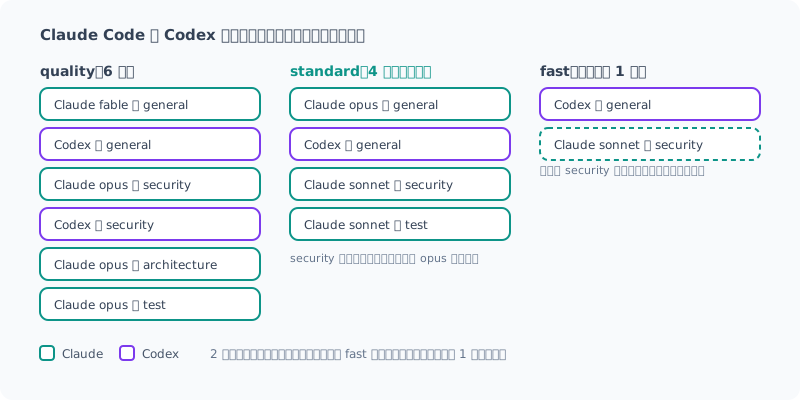
quality: 6 人。設計の妥当性を見る architecture の観点も加わり、Codex も 2 人入るstandard: 4 人。全般を 2 社で見て、セキュリティとテストを軽いモデルで足すfast: ふだんは 1 人。セキュリティの担当は、危険な変更のときだけ動く
どのプリセットでも、2 社が入っていればパネルには両方が入ります。ただし fast でふだん動くのは Codex の general だけで、Claude の security は危険な変更のときだけ動きます。また standard と fast では、小さく低リスクな変更だとレビュアーは 1 人(general)になります。毎回 2 社で見るとは限りません。
3. 環境ごとのレビュアーの人数を比べる
入っている CLI によって、レビュアーの人数も変わります。
| 環境 | quality | standard | fast |
|---|---|---|---|
| Claude Code と Codex | 6 人 | 4 人 | 1 人(+危険なとき 1 人) |
| Claude Code だけ | 4 人 | 4 人 | 1 人(+危険なとき 1 人) |
| Codex だけ | 4 人 | 2 人 | 1 人(+危険なとき 1 人) |
Codex だけのときに standard が 2 人なのは、Codex の回に書いたとおり、同じ AI を同じ役で並べる枠や、安いモデル用の枠を作らないからです。
Claude Code だけのときの
fastは、ふだん動くレビュアーが opus の general です。設計役も opus なので、軽いモデルだけで回るわけではありません。
4. 設計レビューと最適化レベルを比べる
残りの 2 つです。
quality | standard | fast | |
|---|---|---|---|
| 設計レビュー | 自動で判断 | 自動で判断 | しない |
| 最適化レベル | quality | balanced | aggressive |
設計レビューは、実装に入る前に計画そのものをレビューする工程です。「自動で判断」は、計画が大きいときやリスクがあるときだけ動きます。fast ではこれを飛ばします。
最適化レベルは、レビューでどこまでコストを削るかのダイヤルです。
aggressive | balanced | quality | |
|---|---|---|---|
| テストが失敗している | レビューしない | レビューしない | それでもレビュー |
| 小さく低リスクな変更 | レビュアー 1 人 | レビュアー 1 人 | 全員 |
| 1 人に求める指摘の数 | 4 | 6 | 10 |
認証・シークレット・決済・マイグレーションなどに触れる変更は、どのプリセットでも最適化レベルが
qualityに引き上げられます。プリセットが変わるわけではありません。そのプリセットのレビュアー全員(fastなら 2 人)で、指摘の数も上限まで見ます。
どのプリセットでも、計画を承認するまで実装に進まないのは同じです。
5. どれを選ぶか
| こんなとき | おすすめ |
|---|---|
| とりあえず使い始める、ふだんの開発 | standard |
| 認証や決済など、間違いが高くつくコードが多い。トークンに余裕がある | quality |
| 小さな修正が中心、試作、トークンを節約したい | fast |
迷ったら standard のままで大丈夫です。足りないと感じたら上げる、重いと感じたら下げる、で十分です。
6. プリセットを切り替える
エージェントに「dev-orchestra のプリセットを fast に変えて」と頼めば、切り替えてくれます。裏で動くのは次のコマンドです。
dev-orchestra config setup --preset quality   # プリセットを保存する(質問なし)
dev-orchestra config set preset fast          # ほかの設定は残したまま切り替える
プリセットはグローバル設定にキー 1 つ(preset: fast など)として保存されます。保存されるのは名前だけで、中身は読み込むたびに、そのマシンの CLI に合わせて展開されます。あとから Codex を入れれば、次の実行から自動で Codex がレビューに加わります。
まとめ
- プリセットは「どこにお金をかけるか」の選択。役ごとのモデル・レビュアー・設計レビュー・最適化レベルがまとめて決まる
- 迷ったら
standard。設計に強いモデルを使い、レビューは 2 社で見る qualityはレビュアーが最大 6 人、fastはふだん 1 人- 入っている CLI に合わせて自動で組み替わる。2 社あれば、どのプリセットでもパネルには両方が入る(ただし
fastや小さな変更では、ふだん 1 人で見る) - 危ない変更は、最適化レベルが
qualityに上がり、そのプリセットのレビュアー全員で見る(fastなら 2 人) - 切り替えは
config set preset <名前>か、エージェントに頼むだけ
プリセットの細かな決まりは 設定のドキュメント にあります。
プリセットを選んだあと、リポジトリに合わせて専門のレビュアー(データベース、フロントエンドなど)を足したくなったら、config suggest-roles が提案してくれます。次回は、そのレビュアーとロールの組み替え方を書きます。
GitHub: istb16/dev-orchestra(スターを付けてもらえると励みになります)
English version
Introduction
When you use dev-orchestra for the first time, it asks you to pick a preset.
In the earlier posts (Claude Code, Codex, Antigravity) I just said “pick standard if unsure,” but this time I compare what is inside each one.
Here is the answer up front.
- If unsure, pick
standard. It balances quality and cost, and it is also the default qualityadds reviewers and uses strong models morefastuses a single reviewer most of the time, and runs implementation and fixes mainly on lighter models
With dev-orchestra 1.0.0, I actually expanded the three presets in three environments, Claude Code only, Codex only, and both, to check.
dev-orchestra is open source on GitHub (MIT license). If it looks useful, a star would mean a lot.
A preset is a choice of “where to spend your money”
A preset is a single choice along the cost (tokens) axis. Picking one decides the following four things together.
| What it decides | Meaning |
|---|---|
| Model per role | How strong a model handles design, implementation, fixes, and so on |
| Reviewer lineup | How many reviewers, and from which angles (general, security, test, etc.) |
| Design review | Whether the plan itself is also reviewed before implementation |
| Optimization level | How far to cut cost, such as using fewer reviewers for small changes |
And it is rearranged automatically to match the CLIs installed on that machine. You will not end up with Codex reviewers listed on a machine without Codex, failing every time.
Steps
1. Compare the model per role
On a machine with Claude Code, the models per role look like this.
| Role | quality | standard | fast |
|---|---|---|---|
| orchestrator | opus | sonnet | sonnet |
| architect | fable | fable | opus |
| implementer | fable | opus | sonnet |
| review_fixer | fable | opus | sonnet |
standard uses “the strongest model for design, opus for implementation and fixes.” If the design goes wrong, every later step is wasted, so that is where the money goes.
On a Codex-only machine, every role uses Codex’s recommended model (
recommended-coding). Presets are built without launching the CLI, so the recommended model is the only one that can be specified reliably for Codex. You can set other models per role later.
2. Compare the reviewer lineup
This is where the biggest difference shows. On a machine with both Claude Code and Codex, the lineup looked like this.
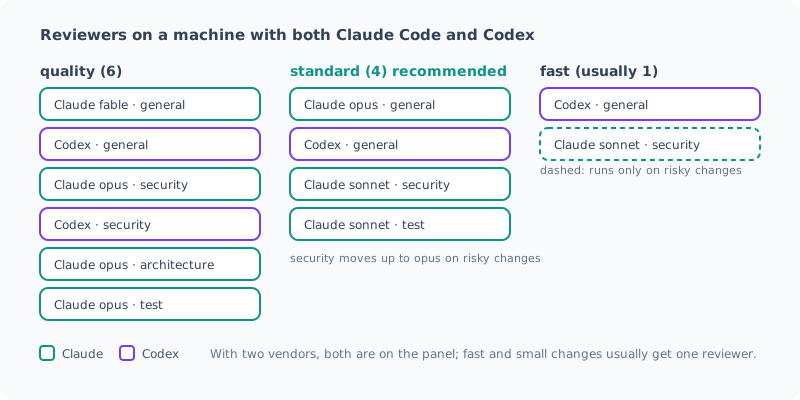
quality: 6 reviewers. The architecture angle, which checks whether the design makes sense, is added, and Codex takes 2 seatsstandard: 4 reviewers. Both vendors cover general review, and security and test are added on lighter modelsfast: normally 1 reviewer. The security reviewer runs only for risky changes
In every preset, if both vendors are installed, the panel includes both. However, in fast only Codex’s general reviewer normally runs, and Claude’s security reviewer runs only for risky changes. Also, in standard and fast, a small, low-risk change gets 1 reviewer (general). It is not always reviewed by both vendors.
3. Compare the number of reviewers per environment
The number of reviewers also changes with the installed CLIs.
| Environment | quality | standard | fast |
|---|---|---|---|
| Claude Code and Codex | 6 | 4 | 1 (+1 when risky) |
| Claude Code only | 4 | 4 | 1 (+1 when risky) |
| Codex only | 4 | 2 | 1 (+1 when risky) |
standard has only 2 with Codex alone because, as I wrote in the Codex post, it does not create seats that line up the same AI in the same role, or seats meant for a cheaper model.
With Claude Code only, the reviewer that normally runs in
fastis general on opus. The architect is also opus, so it does not run on light models alone.
4. Compare design review and optimization level
The remaining two.
quality | standard | fast | |
|---|---|---|---|
| Design review | Decided automatically | Decided automatically | Off |
| Optimization level | quality | balanced | aggressive |
Design review is the step that reviews the plan itself before implementation starts. “Decided automatically” means it runs only when the plan is large or risky. fast skips it.
Optimization level is a dial for how far the review cuts cost.
aggressive | balanced | quality | |
|---|---|---|---|
| Tests are failing | No review | No review | Review anyway |
| Small, low-risk change | 1 reviewer | 1 reviewer | All reviewers |
| Findings asked of each reviewer | 4 | 6 | 10 |
Changes that touch authentication, secrets, payments, migrations and the like have their optimization level raised to
qualityin every preset. The preset itself does not change. All of that preset’s reviewers (2 forfast) review it, up to the maximum number of findings.
In every preset, implementation does not start until you approve the plan.
5. Which one to pick
| Situation | Recommendation |
|---|---|
| Just getting started, everyday development | standard |
| Lots of code where mistakes are costly, like auth or payments, and you have tokens to spare | quality |
| Mostly small fixes, prototyping, or you want to save tokens | fast |
If unsure, leaving it at standard is fine. Move up if it feels insufficient, move down if it feels heavy.
6. Switch presets
Ask the agent “switch the dev-orchestra preset to fast” and it switches for you. Under the hood, it runs these commands.
dev-orchestra config setup --preset quality   # save the preset (nothing is asked)
dev-orchestra config set preset fast          # switch while keeping the other settings
The preset is saved in the global config as a single key (such as preset: fast). Only the name is saved; the contents are expanded to match the machine’s CLIs each time they are loaded. If you install Codex later, Codex joins the review automatically from the next run.
Summary
- A preset is a choice of “where to spend your money.” It decides the model per role, the reviewers, design review, and the optimization level together
- If unsure, pick
standard. It uses a strong model for design, and reviews with both vendors qualityhas up to 6 reviewers;fastnormally has 1- It is rearranged automatically to match the installed CLIs. With both vendors, every preset’s panel includes both (but
fastand small changes are normally reviewed by one reviewer) - Risky changes have their optimization level raised to
qualityand are reviewed by all of that preset’s reviewers (2 forfast) - To switch, run
config set preset <name>or just ask the agent
The detailed preset rules are in the configuration docs.
After choosing a preset, if you want to add specialist reviewers suited to your repository (database, frontend, etc.), config suggest-roles will suggest them. Next time, I will write about those reviewers and how to rearrange roles.
GitHub: istb16/dev-orchestra (a star is always appreciated)
関連記事 Related Posts
Codex に dev-orchestra を入れて使ってみた Using dev-orchestra with Codex
Codex にも dev-orchestra を入れてみました。Codex だけの環境でも動きますが、Claude Code と両方入れると、別々の会社の AI がレビューする推奨構成に自動でなります。Codex の場合だけの機能と注意点も最後にまとめました。 I installed dev-orchestra in Codex too. It works with Codex alone, but with both Claude Code and Codex installed, it automatically switches to the recommended setup where AIs from different companies review your code. I also summarized the Codex-specific features and caveats at the end.
設計・実装・複数AIレビューを1文で回す dev-orchestra を公開してみた I Released dev-orchestra: Design, Implementation, and Multi-AI Review from a Single Request
Claude Code / Codex / Antigravity で動くプラグイン dev-orchestra の紹介です。何ができるか、公式の codex-plugin-cc との違い、Claude Code だけでも使う意味、そしてデメリットまでまとめました。 An introduction to dev-orchestra, a plugin that runs on Claude Code / Codex / Antigravity. I cover what it does, how it differs from the official codex-plugin-cc, why it's worth using even with Claude Code alone, and its downsides.
AIに複数レビューさせるのが面倒すぎて、自動で回すプラグインを作ってみた AIに複数レビューさせるのが面倒すぎて、自動で回すプラグインを作ってみた
AIに書かせたコードを別のAIにもレビューさせたい。でも手作業でやると、ターミナル間のコピペと待ち時間で疲れ果てる。それを仕組みにしたプラグイン dev-orchestra の 1.0.0 を出したので、作った経緯と使ってみての感想をまとめました。 AIに書かせたコードを別のAIにもレビューさせたい。でも手作業でやると、ターミナル間のコピペと待ち時間で疲れ果てる。それを仕組みにしたプラグイン dev-orchestra の 1.0.0 を出したので、作った経緯と使ってみての感想をまとめました。