Introduction
Claude Code has a command called /insights. Run it, and it analyzes your past session history and generates a report covering things like:
- What kind of work you use Claude Code for
- Common work patterns
- What’s working well
- Where you tend to get stuck
- Workflows you could improve
I tried it out, so here’s what was in the report (with confidential details reworded).
Running It
It’s simple: just type the following at the Claude Code prompt.
/insightsAfter a few minutes, a summary appears in the terminal, and a shareable HTML report is generated locally.
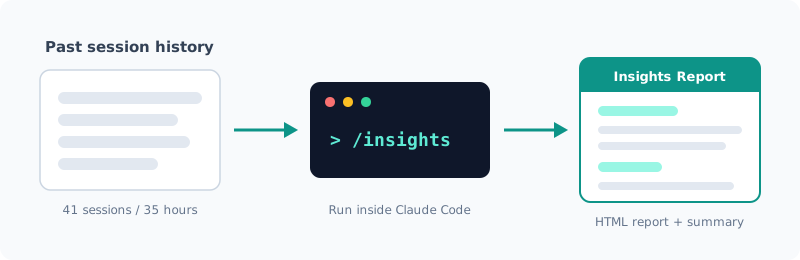
This time it analyzed 41 of 57 sessions, 404 messages, about 35 hours of work, and 29 commits (about one month’s worth).
With only a few sessions, there isn’t enough material to analyze, so I recommend running it after you’ve used Claude Code for a while.
What the Report Contains
The report was made up of sections like these.
| Section | Contents |
|---|---|
| Project areas | Which projects you worked on, and how many sessions each |
| Interaction style | An analysis of how you give instructions and step in |
| What’s working well | Workflows that are leading to results |
| Friction points | The causes of lost time, categorized, with real examples |
| Suggestions | Proposed CLAUDE.md additions, features to try, example prompts |
| Advanced workflows | Suggestions for the next step beyond how you work now |
| Fun facts | Amusing episodes from your sessions |
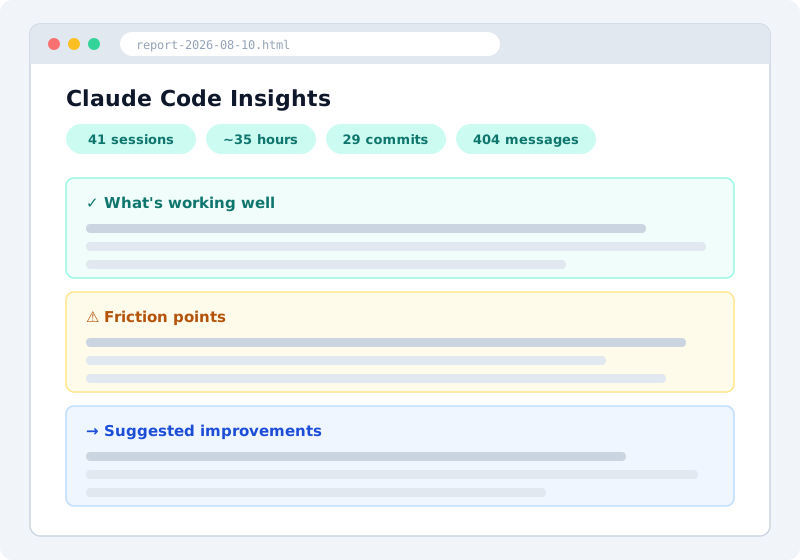
The actual report includes my work details verbatim, so the image above is an illustration of its structure.
What sets it apart is that it goes beyond usage statistics and analyzes how you actually work, with observations like “Sessions start with a request for a concrete deliverable and end with a commit and push. You treat committing as the definition of done.”
What It Listed as Working Well
The report pointed out three main good habits.
1. Having Claude Ask Questions to Pin Down Requirements Before Implementing
When I ask for a new feature, instead of having Claude write code right away, I first have it ask me about the shape of the data, edge cases, and layout, and only then start implementing. According to the analysis, sessions that went this way had almost no rework.
2. Verifying in a Real Browser Instead of Stopping at “It Should Work”
The habit of verifying fixes not just with Vitest unit tests but also in a real browser with Playwright. As an example, it cited a session fixing a bug with duplicate API calls, where network interception confirmed that the API calls dropped from 4 to 2.
3. Rolling Back a Quick Fix with Side Effects
It also picked up, as a good call, a case where Claude had added a workaround for a browser limitation, and I noticed it had side effects visible to users and had it reverted. It seems to look not only at what succeeded but also at what you rejected.
Friction Points: It Points Out Your Own Habits Too
For me, this was the most useful section. It pointed out not only problems on Claude’s side but also the habits of the person using it (me).
1. Asking for Work While an Integration Wasn’t Set Up
I had repeatedly asked it to automate weekly reports using an MCP server that connects to our internal time-tracking tool, but the MCP server’s configuration itself was broken, and 4 sessions were mostly wasted. The report said that “if you’d had it check the connection in the first message, 30 minutes of wandering would have been a 30-second answer.” I think that’s exactly right.
2. Having It Guess Business Rules Without Real Data
When I had it implement the logic for determining holidays without showing it an actual API response, Claude built a plausible (but wrong) set of rules, and it only worked correctly once I pasted the real JSON. The point was that for requirements that depend on real data such as API payloads, pasting the real thing in the first message is the reliable way.
3. Interrupting Claude’s Exploration Commands Midway
When Claude started running commands at the beginning to get a picture of the situation, I sometimes interrupted them, and it turned out that 2 sessions ended without producing anything because of this. Sessions that started with “continue where we left off” seem especially prone to failure, since Claude has to rediscover the previous state by guessing. The suggestion was to start a resumed session by writing how far you got last time and what to do next.
All of these are obvious once someone says them, but being shown quantitatively, across sessions, that you keep making the same mistake is persuasive.
It Even Suggests Improvements
It doesn’t stop at analysis: another nice point is that it suggests concrete next actions. My report included, for example:
- Proposed CLAUDE.md additions: ready-to-paste text such as “Don’t draw firm conclusions from indirect evidence; check the real thing before reporting” and “Check the prerequisites for the work (MCP connection, OAuth scopes) first, and if something is missing, present how to fix it and stop”
- Turning things into custom skills: a suggestion to turn routine workflows I keep typing by hand (such as generating weekly reports) into a skill run with a single
/command. Comes with a SKILL.md template - Hooks: an example setup for a PostToolUse hook that runs tests automatically after every edit (with the settings.json JSON)
These aren’t generic tips but suggestions based on my own usage history, so they were easy to adopt as is.
Note: The report includes your work details, project names, tool names and so on verbatim. If you share or publish its contents, make sure you don’t touch anything under NDA or confidential.
Summary
- Just type
/insightsand you get an analysis report (HTML) of your past sessions - It analyzes not just usage statistics but also your good habits, the causes of friction, and even your own quirks as a user
- It suggests next actions such as CLAUDE.md additions, skills, and Hooks, with concrete examples
- The report contains confidential information, so check what to reword or leave out before sharing
The more you’ve used Claude Code, the more you’ll get out of it. If you’re curious, give it a try.
Related Posts
I Measured dev-orchestra: Time per Request, and Findings by Number of Reviewers
With dev-orchestra 1.2.1, I made one small feature request and measured how long it took (about 6 minutes, not counting my approval) and how many findings were reported and accepted with 1, 2, and 4 reviewers. More reviewers meant more accepted findings, but the extra ones were about tests.
Giving dev-orchestra Standing Instructions per Role
I tried instructions, added in dev-orchestra 1.2.1. Standing instructions for the implementer or reviewers written in the repository go into every prompt. I check, with real output, how they are shown, where they go, and how a change to the instructions is treated.
[Released] dev-orchestra: Parallel Work Units and Per-Role Instructions v1.1.0 - v1.2.1
A roundup of dev-orchestra's changes from v1.1.0 to v1.2.1: running a plan as work units side by side, standing instructions per role, questions before the design, and settings for progress reports. If you capture its output on Windows, note the encoding change.