How I Made the Local LLM on My Ryzen AI PC 7 Times Faster (llama.cpp + Vulkan + Qwen)
Introduction
Last time, I removed the entire local LLM setup from my mini PC with a Ryzen AI 9 HX 370. I deleted 68.84 GB and ended up with a clean slate.
This time I build a new setup on top of that. I had three requirements:
- It works entirely from the command line (no dependence on a GUI)
- It uses the GPU to be fast
- It runs Qwen
To give the conclusion first: generation became about 7 times faster than the old setup. And along the way, I picked the newest model and it backfired. I’ll cover that story too.
The Result
winget install --id ggml.llamacppllama-server -hf unsloth/Qwen3.6-35B-A3B-MTP-GGUF:UD-Q4_K_XL
--port 8080 -c 16384 -ngl 99
-b 8192 -fa on --cache-reuse 256 --kv-unified --jinja
--spec-type draft-mtp --spec-draft-n-max 2| Item | Old setup | New setup |
|---|---|---|
| Generation (code) | Equivalent to 2.6 t/s | 20.7–22.6 t/s |
| Generation (prose) | Same | 17.5 t/s |
| Prompt processing | — | 353 t/s |
I didn’t use a single setting that lowers quality. Here’s how I got there.
Why Vulkan?
While reading the config files during last time’s cleanup, I found this:
"llamacpp": { "backend": "cpu", ... }It was running inference on the CPU, even though the machine has a Radeon 890M and an NPU. Thanks to the 96 GB of memory, large models ran anyway, so it had been left alone for half a year with a “well, it works” attitude.
So if I’m going to use the GPU, AMD offers two paths: ROCm and Vulkan. Someone had published measurements on the same Ryzen AI 9 HX 370 + DDR5-5600.
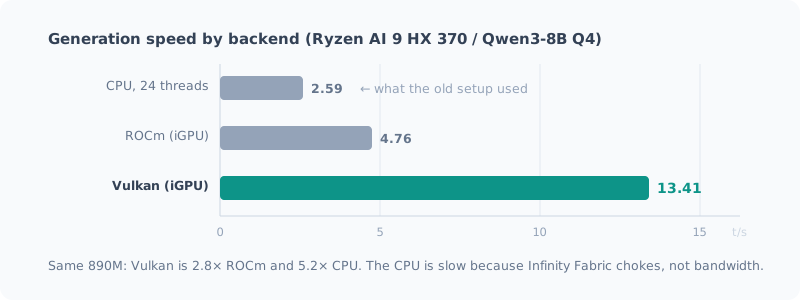
Vulkan was 2.8 times faster than ROCm and 5.2 times faster than the CPU. It’s surprising that AMD’s own ROCm loses to Vulkan, but the reasons are clear.
- gfx1150 (890M) is still not listed in ROCm’s official support matrix
- ROCm is 41% faster only at prompt processing, and for chat, generation speed matters more
The CPU is slow not because of memory bandwidth but because Infinity Fabric is the bottleneck. The CPU cores can’t saturate the memory controller, but the iGPU can.
I Didn’t Use WSL
Since it gives access to the Linux toolchain, it was a strong candidate at first. After looking into it, it’s at a disadvantage for this use case.
- Vulkan on WSL2 goes through emulation, which costs performance
- ROCm on WSL2 has gained Strix support, but what you get is “the slower ROCm”
- GTT kernel parameters such as
amdgpu.gttsizecan’t be applied on WSL2
Choosing WSL would have left me with only “the slow path” or “the even slower path.”
Installation Was a Single Command
winget install --id ggml.llamacppThat’s it. The official winget package ships a Vulkan build,
and llama-cli / llama-server / llama-bench end up on your PATH.
> llama-cli --list-devices
Vulkan0: AMD Radeon(TM) 890M Graphics (78739 MiB, 74802 MiB free)
I Was Ready to Tweak the BIOS, but It Wasn’t Needed
When I researched beforehand, several articles carried the same warning:
If the BIOS UMA Frame Buffer Size is
Auto, Vulkan mistakes VRAM for 0 bytes and fails to load the model. Change it toFixedand allocate memory.
I had even written down the steps for rebooting into the BIOS and braced myself, but it didn’t happen in my environment.
The dedicated VRAM the driver reports is still 2 GB. Even so, llama.cpp sees about 77 GB (73 GB free). That’s because recent versions of llama.cpp detect shared memory automatically.
As a result, I got away with not touching the BIOS at all and no reboot.
A good example of why it pays to check with --list-devices first.
Picking the Newest Model Backfired
Now for the main part.
I had decided to use Qwen. Looking into it, Qwen3.8-27B (released August 2026) was the latest generation, described as “the first time a Qwen-Max-class model has been made open.” I figured newer would be better and chose it.
Here’s what I measured.
| pp512 | tg128 | |
|---|---|---|
| Qwen3.8-27B Q4_K_M (16.23 GiB) | 29.6 t/s | 3.6 t/s |
3.6 t/s. With a 1,000-token prompt, it takes 34 seconds until the first response, and then 3.6 tokens per second. Not usable for chat.
Settings Didn’t Move It One Bit
I tried everything I could think of to tune my way out of it.
| What I tried | Result |
|---|---|
FlashAttention -fa on | Within noise (if anything, slightly slower) |
| ubatch 512 / 1024 / 2048 | All flat |
-b 8192 | pp only +18%, generation unchanged |
Only the generation speed wouldn’t budge. Working out the bandwidth told me why.
16.23 GiB × 3.6 t/s = 実効 60.5 GB/s(理論 89.6 GB/s の 68%)(That is, an effective 60.5 GB/s, 68% of the theoretical 89.6 GB/s.)
The hardware was performing as it should. A 27B dense model reads all 16 GB of weights for every token, so with 128-bit DDR5-5600 (89.6 GB/s theoretical) it physically can’t go any faster.
It wasn’t a settings problem; it was a model choice problem.
The Bigger File Was Faster
For comparison, I measured Qwen3.6-35B-A3B (MoE), which I had used in the old setup. With 35B total parameters, it’s larger than the 27B model, and its file is 4.5 GB bigger too.
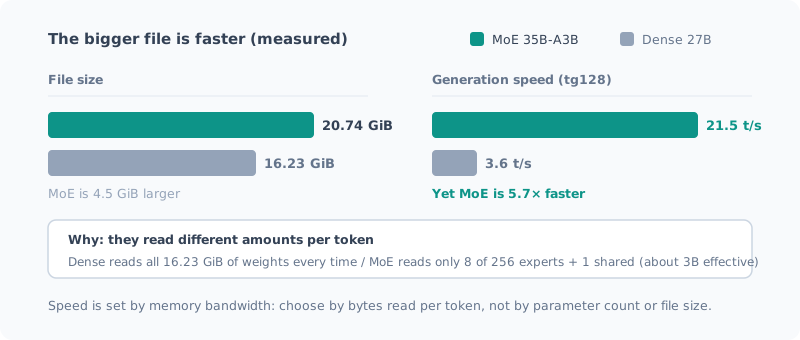
| File | pp512 | tg128 | |
|---|---|---|---|
| Qwen3.8-27B (dense) | 16.23 GiB | 29.6 t/s | 3.6 t/s |
| Qwen3.6-35B-A3B (MoE) | 20.74 GiB | 281 t/s | 20.7 t/s |
| Difference | MoE is 4.5 GiB larger | 9.5× | 5.7× |
The bigger one is 5.7 times faster. It’s counterintuitive, but the reason is simple.
- The dense model reads all 16.23 GiB of weights for every token
- The MoE reads only 8 of its 256 experts + 1 shared (about 3B effective)
Checking the effective bandwidth, the MoE was also around 60 GB/s, the same as the dense model. The hardware delivers the same performance; the only difference is the model’s structure.
In practical terms, with a 1,000-token prompt, the time to first response goes from 34 seconds → 3.6 seconds.
How to choose a model on this machine Not by total parameter count, and not by file size, but by “how many bytes it reads per token.” Bandwidth is the ceiling, so this translates directly into speed.
Choosing a model whose structure fits paid off more than chasing the latest generation.
Tuning Without Losing Quality
With the MoE chosen as the main model, I started squeezing out more speed. The rule: only use tricks that skip or reorder computation.
| Setting | Effect | Quality |
|---|---|---|
-b 8192 | Prompt processing +26% (281→353 t/s) | No impact |
--cache-reuse 256 | Skips recomputing 95% of the shared prefix (see the correction below) | No impact |
-fa on | FlashAttention | No impact |
--kv-unified | Avoids KV fragmentation | No impact |
-b is the batch size. I swept 2048 / 4096 / 8192 / 16384, and
8192 was best; going up to 16384 made it slightly slower.
-ub (micro-batch), on the other hand, had zero effect on both the dense model and the MoE, so I left it alone.
Evidence That --cache-reuse Works
llama-server returns timings with its responses.
Fix a longish system prompt and send consecutive requests, and you get:
cache_n  : 425    ← キャッシュから再利用したトークン
prompt_n : 21 ← 実際に計算したトークン(cache_n is the tokens reused from the cache; prompt_n is the tokens actually computed.)
Of the 446-token prompt, 425 tokens (95%) were not recomputed. If you keep the system prompt fixed, the wait from the second request onward almost disappears.
Correction (2026-09-27): This reuse was not the effect of
--cache-reuse. The startup log saidcache_reuse is not supported by multimodal, it will be disabled; because the mmproj for images was loaded,--cache-reusewas disabled from the start. Even without the mmproj, it’s disabled withnot supported by this contextbecause of the hybrid SSM architecture. Thecache_n 425above came from--cache-prompt, which is on by default (it skips recomputing the part where the beginning matches). The effect was real; I had attributed it to the wrong setting. I go into detail in the post on reusing long documents.
What I Deliberately Didn’t Use: KV Cache Quantization
You can quantize the KV cache with -ctk q8_0.
It’s a standard trick said to cause almost no quality loss (perplexity on par with f16), but I didn’t adopt it.
That’s because when f16 fits, f16 is faster. Quantizing means dequantizing on every token, which hurts more the deeper the context (one measurement shows it dropping to 55% of f16 at 64K depth).
In my environment, Vulkan sees 73 GB, so f16 fits comfortably, and the conclusion was that not quantizing is faster. It’s a fallback for when memory runs short.
Speculative Decoding Gets Slower If You Push It Too Far
Finally, I tried MTP (Multi-Token Prediction) speculative decoding.
A small draft looks a few tokens ahead, and the main model verifies them all at once. If they’re wrong, they’re discarded and the main model’s output is used, so the output distribution doesn’t change. In other words, it’s a lossless speedup.
Qwen3.6-35B-A3B has a build that includes MTP layers, advertised as “1.5–2 times” faster.
I swept --spec-draft-n-max (how many tokens to look ahead) and measured.
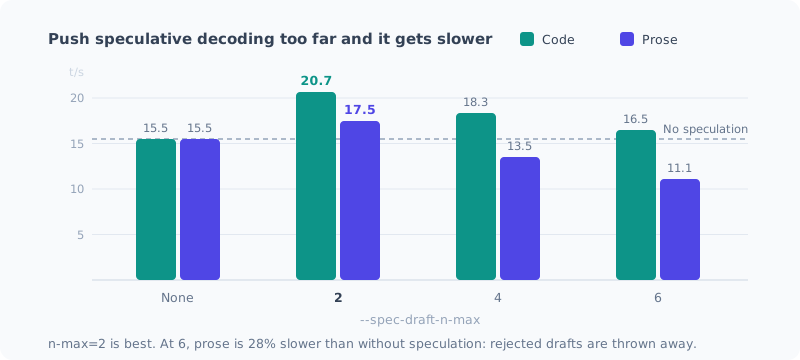
| n-max | Prose | Code |
|---|---|---|
| None | 15.5 t/s | 15.5 t/s |
| 2 | 17.5 t/s (+12.6%) | 20.7 t/s (+33.4%) |
| 4 | 13.5 t/s (−13%) | 18.3 t/s (+16%) |
| 6 | 11.1 t/s (−28%) | 16.5 t/s (+3%) |
Longer did not mean faster. With n-max=6, prose is 28% slower than without speculation.
- Code: the next token is easy to predict and the hit rate is high → longer drafts still pay off
- Prose: harder to predict and misses more often → the longer the draft, the more computation is thrown away, and it slows down
If you handle both, shorter is safer, and 2 was optimal. It didn’t reach the advertised 1.5–2 times, but it’s a definite gain.
Speculative decoding is not something that “just makes things faster once you turn it on.” Always measure both with and without it and compare.
How I Botched the Measurement
In my first measurement, the control run (without speculation) failed to start because of a timeout, and only the numbers with speculation were left. I had started measuring before the 22.9 GB model download finished, and it used up the startup wait limit.
Numbers from only one side are no evidence of “is it faster?” I redid it. The lesson: when a measurement involves a first-time download, fetch the model first and then run the comparison.
Summary
| Old setup | New setup | |
|---|---|---|
| Backend | CPU | Vulkan (iGPU) |
| Model | — | Qwen3.6-35B-A3B MTP (MoE) |
| Generation | Equivalent to 2.6 t/s | 17.5–22.6 t/s |
It became about 7 times faster. In order of impact:
- Choose an MoE model (5.7 times the dense 27B)
- Use Vulkan (5.2 times the CPU)
- MTP speculative decoding (+12.6–33.4%)
-b 8192(prompt processing +26%)
The top two were overwhelming; the finer flags were just the final seasoning. My takeaway: if you get the big decisions right, you don’t need much fine-tuning.
The biggest lesson this time was that the newest model isn’t necessarily the best. Qwen3.8-27B is certainly a new and strong model, but its structure didn’t suit a machine with only 89.6 GB/s. Rather than “newest” or “high performance” on a spec sheet, I should have chosen by whether it fits my machine’s bottleneck.
The cache, which had ballooned to 4 models and 61.2 GB during testing, went back down to 23.3 GB after I deleted the ones that had served their purpose. So as not to waste last time’s cleanup, I want to make a habit of getting rid of models downloaded for testing right away.
Related Posts
The Complete Guide to Running a Local LLM at Usable Speed on a Ryzen AI Mini PC (2026 Edition)
All the steps to run a local LLM at around 20 tokens per second on a Ryzen AI 9 HX 370 (Radeon 890M) mini PC, in one post. Install the Vulkan build of llama.cpp, pick an MoE model, add only the settings that help, and end up able to just type llm. Every stumbling point I hit is included.
Wiping the Local LLM Setup on My Ryzen AI PC Clean
To rebuild the local LLM setup I had piled up on my AMD Ryzen AI 9 HX 370 machine with the latest approach, I'm deleting it all first. I cover taking inventory of what's left, the removal steps, and what you shouldn't delete.
Why I Didn't Use the Ryzen AI NPU
I've been running local LLMs on a machine with a 50 TOPS NPU, but I've never used the NPU. When I looked into whether I could, I found there's no guarantee it runs, it's slower than the iGPU even if it does, and its biggest advantage doesn't apply to how I use it. A record of stopping right after downloading the installer.