Adding a Local LLM as a dev-orchestra Code Reviewer
Introduction
Update (2026-10-25): With dev-orchestra 1.0.0, I rewrote the steps for writing an adapter from scratch and connecting a local LLM in Connecting My Own Agent to dev-orchestra (Local LLM Edition). If you’re connecting one now, that post is the shortcut. This post is a record of my trial and error back in the 0.8.0 days.
Last time, I set up a local LLM environment (llama.cpp + Vulkan + Qwen3.6-35B-A3B) on a mini PC with Ryzen AI. Generation runs at around 20 t/s, which is plenty fast for chatting.
Since I now have a model on hand, I wondered whether I could use it for code review. I use a Claude Code plugin called dev-orchestra, which has a mechanism for having multiple AIs review code independently.
By default there are two reviewers: Claude and Codex. I’m adding the local Qwen as a third.
I had three reasons:
- No charges — it’s free no matter how many times it reviews
- The code never leaves my machine — I can use it on things I can’t send outside
- An independent third opinion — another pair of eyes for “is it really right?” when the other two agree
The short answer: it works. But it didn’t connect cleanly; there was one wall.
The Wall: Providers Wrap CLIs, Not APIs
dev-orchestra does have a way to “add a reviewer”.
dev_orchestra.py reviewer add --provider <名前> --role generalBut --provider only accepts existing CLIs like claude and codex.
The local LLM exposes an OpenAI-compatible API,
so I assumed “setting the endpoint will be enough to connect it”,
but reading the adapter code showed me otherwise.
def build_command(self, mode, resolved, cwd, extra_args, options) -> List[str]:
    ...
What a provider returns is an array of command arguments. And the side that runs it looked like this:
proc = subprocess.Popen(
    list(command), cwd=cwd,
    stdin=subprocess.PIPE, stdout=subprocess.PIPE, ...
)
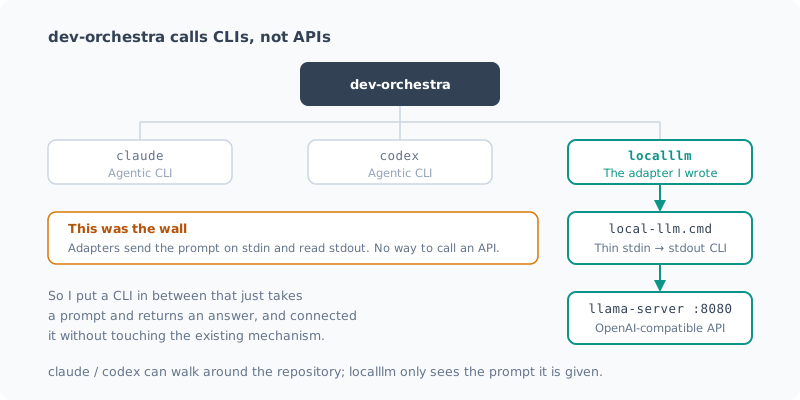
The prompt is passed on stdin, and the answer is read from stdout. In other words, a provider is “something that wraps a CLI”, with no way to call an API.
The Fix: Put a Thin CLI in Between
Modifying dev-orchestra itself seemed like the wrong approach, so I wrote a CLI that just takes a prompt and returns an answer.
prompt = sys.stdin.read()
answer = complete(prompt, port, ...)   # localhost:8080 に投げるだけ
sys.stdout.write(answer)
It uses only the standard library (urllib.request was enough).
If the server is down, it starts it automatically and waits.
Reviews run unattended, so it would be a problem if things stopped here.
Don’t forget to make it respond to --version. dev-orchestra uses that to check whether the CLI exists.
Write Batch Files in ASCII
Since this is Windows, I added a .cmd wrapper, and at first I got this:
'。' is not recognized as an internal or external command,
operable program or batch file.
The cause was a Japanese comment in a REM line.
cmd.exe reads the UTF-8 bytes using the OEM code page,
so the comment gets mangled and interpreted as a command. It still works, but shows an error every time.
The safe choice was to write batch files in ASCII only.
Writing the Adapter
All that’s left is an adapter that wraps the CLI.
class LocalLLMProvider(Provider):
    name = "localllm"
    executable = r"C:\Projects\local-llm\bin\local-llm.cmd"

    def build_command(self, mode, resolved, cwd, extra_args, options):
        if mode == MODE_IMPLEMENT:
            raise ModelResolutionError(
                "localllm cannot implement: it has no file access."
            )
        ...
It explicitly refuses implement mode. This CLI can’t read or write files, so if it were accidentally assigned the implementer role, it would fail in the hardest way to notice: “it succeeded, but nothing changed”. It’s safer to make it say it can’t do what it can’t do.
Registering it took just one line in the provider registry.
register(localllm.LocalLLMProvider.name, localllm.build_provider)It Lives in the Plugin Cache, So Updates Wipe It
The adapter goes here:
%USERPROFILE%\.claude\plugins\cache\dev-orchestra\dev-orchestra\0.8.0\
  scripts\orchestrator\providers\
As the name says, it’s a cache, so updating the plugin deletes it. The path even includes the version number.
So I kept the original in my own project and prepared an install script that restores everything when you run it again.
pwsh -File integrations\dev-orchestra\install.ps1            # 導入
pwsh -File integrations\dev-orchestra\install.ps1 -Status    # 状態確認
pwsh -File integrations\dev-orchestra\install.ps1 -Uninstall # 撤去
The reviewer registration itself lives in %APPDATA%\dev-orchestra\config.yaml, so it survives.
What breaks is that only the adapter disappears and you get “unknown provider”.
With a modification like this, one you “have no choice but to put somewhere updates will wipe”, if you don’t prepare recovery steps alongside it, your future self will definitely be in trouble six months later.
[Update] This section describes 0.8.0. 0.9.0 added an official mechanism, so there’s no longer any need to modify the plugin. If you’re doing the same thing today, don’t use this method. I wrote about what happened in “Postscript: An Official Mechanism Arrived” at the end of the post.
Trying It Out
The registration worked.
1. claude-general     claude   opus               latest   general
2. codex-general      codex    recommended-coding latest   general
3. localllm-qwen      localllm qwen3.6-35b-a3b    latest   general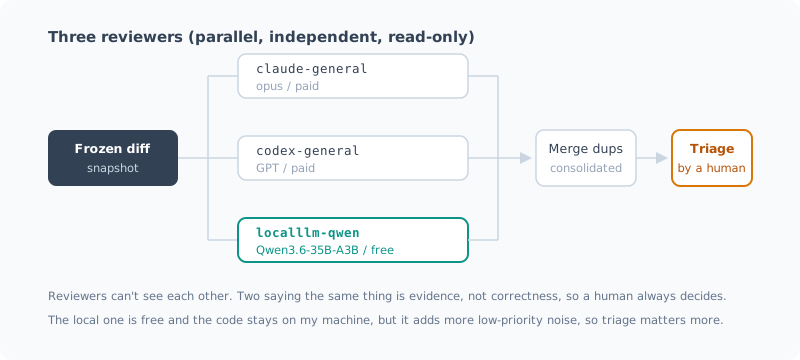
But being registered and being usable are two different things. dev-orchestra requires review results in a fixed format.
## Finding
- Severity: critical | high | medium | low
- File: <path>
- Line: <number, range, or n/a>
- Category: <correctness | security | performance | tests | …>
- Problem: ...
And a review that doesn’t follow the format is treated as unparsed, a “failure”.
The documentation put it like this:
An unreadable report is not evidence that the code is fine. Treating it as “no problems” is the worst way a review tool can break.
Whether a 35B local model can stick to this format is something you only find out by trying.
Planting Bugs to Test It
I fed it a diff with two deliberate defects.
 def average_price(items):
-    if not items:
-        return 0
-    return sum(i.price for i in items) / len(items)
+    return sum(i.price for i in items) / len(items)
+
+def top_n(items, n):
+    ordered = sorted(items, key=lambda i: i.price, reverse=True)
+ return ordered[:n+1]- Removed the empty-list guard →
ZeroDivisionError - Off-by-one in
[:n+1]→ returns n+1 items instead of n
The results:
| Planted defect | Detected | Severity |
|---|---|---|
| ZeroDivisionError from removing the guard | Detected | critical |
Off-by-one in ordered[:n+1] | Detected | high |
It found both. The format was followed perfectly, ready to parse as is. It took 29 seconds.
Lots of Noise
That said, three low-priority findings came along with them. Here’s one of them:
- Severity: low
- Category: performance
- Problem: Removing the empty check means the division now runs even for an empty list.
- Impact: The performance impact is negligible; the main problem is the logically wrong behavior.
It raises the same line it already flagged as critical, this time as performance. As it says itself, “the performance impact is negligible”, so this is effectively a duplicate.
Compared with commercial models, this kind of padding stands out. dev-orchestra merges duplicates to some extent, but duplicates worded differently have to be weeded out by a human.
Add more reviewers, and the triage work grows with them. Adding a third reviewer was that kind of trade-off too.
Bonus: The “CLI Isn’t Installed” Culprit Was PATH
While I was working, doctor started saying this:
Problems
  - Orchestrator: claude CLI is not installed
  - Architect: claude CLI is not installed
  ...
Four roles and one reviewer were dead, it said. For a while I wondered whether I needed to reinstall the claude CLI, but that wasn’t it. I had reinstalled claude and the PATH had changed, but my shell was still holding the old PATH, that’s all.
$env:PATH = [System.Environment]::GetEnvironmentVariable('PATH','Machine') + ';' +
            [System.Environment]::GetEnvironmentVariable('PATH','User')
After reloading it, I got No problems found.
If you’re told a CLI “isn’t installed” right after reinstalling it, suspect a stale PATH first. I should have suspected my own shell before the tool.
What It’s Good and Bad At
| Role | Usable? | Why |
|---|---|---|
| reviewer | Yes | The diff is passed in the prompt, so it works without reading the repository |
| architect / implementer / review_fixer | No | It can’t read or write files |
claude and codex are agentic CLIs that can follow related files and investigate on their own. This local LLM, on the other hand, only sees the prompt it’s given. That means it can’t make findings like “I also checked the callers of this function”.
So it’s not a replacement for commercial models. Adding it as a third, independent pair of eyes is what fits the reality.
Postscript: An Official Mechanism Arrived
(Added 2026-09-25)
After I wrote this post, dev-orchestra 0.9.0 came out, and as expected, the adapter disappeared.
Problems
  - reviewers[2]: unknown provider 'localllm'
  - Reviewer localllm-qwen: unknown provider 'localllm'
It broke exactly the way I expected, too. The reviewer registration was still in config.yaml,
but the adapter it pointed to was gone. Only half of the setup survives,
so you can’t tell at the moment you update.
This time, though, I didn’t need to run the recovery script. That’s because 0.9.0 had added official support for user-defined providers.
No More Modifying the Plugin
They go under the config directory:
<設定ディレクトリ>\providers\*.pyIt’s the same place as config.yaml, so they survive plugin updates.
The adapter and the config that refers to it now have the same lifetime.
The change on my side was just one import line.
-from .base import Provider, ResolvedModel, ...
+from orchestrator.providers.base import Provider, ResolvedModel, ...
It’s loaded from outside the package, so relative imports don’t work. The documentation also said, “if you copy a built-in, change that one line”.
It also helps that doctor now shows where each one comes from.
User providers
  Directory: ...\dev-orchestra\providers
  Code in this directory is imported at startup, from outside the plugin.
  Imported: localllm  <- ...\providers\localllm.py

Local LLM (llama.cpp) (localllm)
  Source: user module ...\providers\localllm.py
You can tell at a glance that “this adapter is third-party, and it comes from here”.
The Real Story: Writing the Installer in PowerShell Was a Mistake
The migration itself was easy, but this is where I stepped into the nastiest trap of this whole exercise.
I copied the adapter to the new location, but doctor kept saying this:
User providers
  Directory: C:\Users\...\AppData\Roaming\dev-orchestra\providers (not present; nothing imported)
It exists from PowerShell, but not from Python.
PowerShell:  Test-Path  -> True    (localllm.py もある)
Python:      os.path.isdir -> False
Same path string. And dev-orchestra could read config.yaml
in the same directory just fine.
The culprit was file system virtualization in the Microsoft Store version of Python.
Store apps redirect reads and writes to %APPDATA% into the package.
| Who’s looking | Where reads and writes actually go |
|---|---|
| PowerShell | C:\Users\<user>\AppData\Roaming\dev-orchestra\ |
| Store Python | %LOCALAPPDATA%\Packages\PythonSoftwareFoundation.Python.3.13_…\LocalCache\Roaming\dev-orchestra\ |
The evidence was that the same config.yaml had a different size depending on who looked.
PowerShell から : 0 バイト
Python から     : 705 バイト
What makes it nasty is that you can’t spot it from the path string.
os.environ['APPDATA'] returns the ordinary C:\Users\...\AppData\Roaming.
The difference shows up not in the path but in the file operations themselves.
So the workaround “just ask Python for the correct path and it’ll be safe” doesn’t work either. I actually implemented that, wrote to the same place, and failed the same way.
The fix was to rewrite the installer in Python.
# 読む側と同じインタプリタに書かせる。
# そうすればリダイレクトがあってもなくても、必ず同じ場所になる。
shutil.copyfile(SOURCE, target)
Instead of trying to compute the path correctly, make it so you don’t have to compute it at all. That was the right answer.
If you switch to a different Python (such as the python.org build), the redirection goes away and your config looks like it “disappeared” along with everything else. I made
--statusshow a warning about it.
Lessons
- A modification that feels like it “has to live somewhere updates will wipe” won’t last long. This time official support arrived quickly, and my own workaround became unnecessary. I think it means other people were feeling the same inconvenience (I didn’t request it; the timing just happened to line up)
- The same path doesn’t necessarily mean the same place. When Windows Store apps are involved, first check “which process writes, and which process reads”
Summary
- dev-orchestra providers are designed to wrap CLIs, not APIs. Even with an OpenAI-compatible API, you can’t connect it as is
- Putting a thin stdin → stdout CLI in between was enough to connect it without touching dev-orchestra itself
- It detected both planted bugs and stuck to the required output format
- But there’s a lot of low-priority noise. Triage takes more work
- At first the only way was to modify the plugin itself, but 0.9.0 added an official user-provider mechanism, so no modification is needed (see the postscript)
- The same path string doesn’t necessarily mean the same place.
The Store Python
%APPDATA%redirection cost me half a day
I now have a third reviewer that costs nothing and keeps the code on my machine. It’s not as sharp as the commercial models, but “another pair of eyes you can run as often as you like for free” has its uses.
Next, I plan to run this three-reviewer setup on real development work and see how often the local one hits (and misses).
Related Posts
I Measured dev-orchestra: Time per Request, and Findings by Number of Reviewers
With dev-orchestra 1.2.1, I made one small feature request and measured how long it took (about 6 minutes, not counting my approval) and how many findings were reported and accepted with 1, 2, and 4 reviewers. More reviewers meant more accepted findings, but the extra ones were about tests.
Giving dev-orchestra Standing Instructions per Role
I tried instructions, added in dev-orchestra 1.2.1. Standing instructions for the implementer or reviewers written in the repository go into every prompt. I check, with real output, how they are shown, where they go, and how a change to the instructions is treated.
Rearranging dev-orchestra's Reviewers and Roles
How to set the model for each role in dev-orchestra, how to choose reviewer focuses, and config suggest-roles, which proposes domain specialists. I also showed a change with deliberately planted bugs to 9 reviewers to see what changes as you add more of them.