Making a Local LLM Part of My Daily Terminal Use
Introduction
Last time, I made my local LLM 7x faster. Generation at around 20 t/s. I was happy with the numbers.
And then I barely used it.
The reason was simple: getting to the point of using it was a hassle.
pwsh -File C:\Projects\local-llm\scripts\serve.ps1
# …40秒待つ…
# ブラウザで localhost:8080 を開く
When I’m in the middle of working in a terminal, I’m not going to bother with that. Before speed even mattered, the path to using it was too long.
This time I’m getting rid of that. The goal: “boot the PC, type llm, and get an answer”.
The End Result
llm "PowerShellでファイル一覧を取得するには?"llm # 引数なしで対話モードI don’t think about starting the server. If it’s stopped, it starts on its own.
Where to Hide the Hassle
If “start the server before using it” is a required step, there are two options:
- Keep it resident — start it at boot and leave it running
- Start it lazily — start it the moment it’s needed
At first I considered option 1. Registering it in Task Scheduler would take no time. But this model holds 24 GB the whole time. I have 96 GB installed, so there’s room, but some weeks I only use it a few times, and I didn’t like the idea of leaving 24 GB idle all the time.
I chose option 2. On the client side, I did this:
llm "質問"
  ↓
サーバは動いている?
  ├─ Yes → そのまま聞く
  └─ No  → 裏で起動 →(約40秒)→ 聞く
You wait 40 seconds only the first time; once it’s up, there’s no wait after that. The aim is not to remove the step, but to make it invisible.
Give Me the 24 GB Back When I’m Not Using It
Even with lazy start, once you use it, it stays up. Ask it one thing in the morning, and it holds 24 GB until night.
I was about to write my own “shut it down after 12 hours of no use” mechanism,
but before that I skimmed --help, and there it was.
--sleep-idle-seconds SECONDS
        number of seconds of idleness after which the server will sleep
The description is a single line, so I couldn’t tell whether the memory is really freed. I set it to 60 seconds and measured.
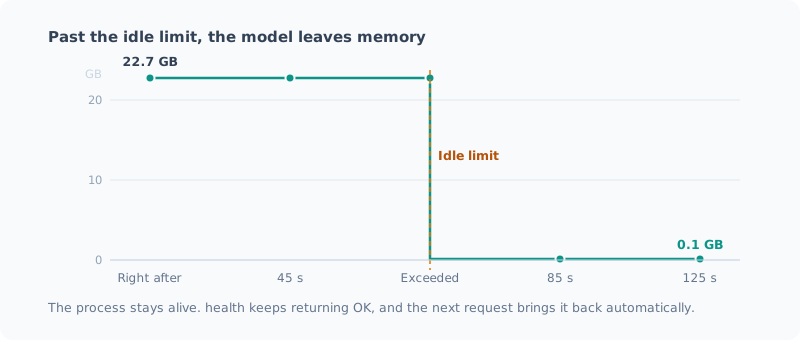
リクエスト直後 : 22.7 GB
45 秒後        : 22.7 GB
85 秒後        : 0.1 GB   ← 22.6 GB 解放
125 秒後       : 0.1 GB
health         : OK
It was freed. And the process stays alive,
with health continuing to return OK. It comes back automatically on the next request.
I had been planning to write my own “kill the process after 12 hours” task, but a single flag was all it took. And since nothing gets killed, coming back only means reloading the model.
For everyday use I set it to 12 hours (43200 seconds).
--sleep-idle-seconds 43200The lesson here boils down to “read
--helpbefore writing it yourself”. If I had started writing it, I would have built a process-watching task, worked out when to kill it, and rebuilt the 40-second restart all over again.
It Was Taking Up 48 GB
Now that it worked, I checked stopping and restarting. That’s when I found this:
PID 105720  23.95 GB  ← ポート 8080 を保持(正常)
PID  94128  23.96 GB  ← ポートを取れなかった孤児
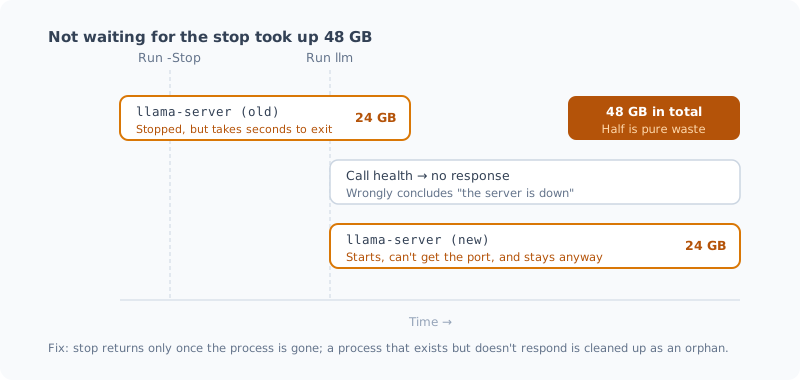
Two llama-server processes were running, 48 GB in total. Half of it was pure waste.
This was the cause:
# 直す前
$p = Get-Process llama-server -ErrorAction SilentlyContinue
if ($p) { $p | Stop-Process -Force }   # ← 投げっぱなしで即座に返る
Stop-Process doesn’t wait for the process to exit. A process holding 24 GB takes a few seconds to clean up.
If you run llm in that window:
- It calls
health→ no response, because the server is still dying - It decides “the server is down”
- It starts a second one
- The second one can’t get the port. But the model is already loaded, so it stays
The one that couldn’t get the port keeps holding 24 GB without doing any work.
llm still gets its answer from the first one (the one that’s still alive),
so it looks like it succeeded. I only noticed because I happened to look at the process list.
The Fix
On the stop side, I made it wait until the process is gone.
$procs | Stop-Process -Force
foreach ($i in 1..30) {
    Start-Sleep -Milliseconds 500
    if (-not (Get-Process llama-server -ErrorAction SilentlyContinue)) { return $true }
}
On the start side, I made it suspicious of the “process exists but doesn’t respond” state. There are two possible cases:
- It’s still starting up and loading the model → just wait
- It’s an orphan that couldn’t get the port → clean it up
You can’t tell them apart, so it first waits 2 minutes, and if there’s still no response, treats it as an orphan.
$existing = @(Get-Process llama-server -ErrorAction SilentlyContinue)
if ($existing.Count -gt 0) {
    # 起動途中かもしれないので、まず待つ
    ...
    # 2 分待って応答しないなら孤児
    [void](Stop-Server)
}
After the fix, stop returns after confirming a complete exit in 3.2 seconds,
and even running llm right after stopping leaves just one process.
“Failures that look like success” are the worst kind. No error, and the answer comes back. Memory just gets eaten quietly. The habit of looking at the process list now and then turned out to be worth it.
Typing llm from Anywhere
I put one function in my PowerShell profile.
function llm {
    $script = 'C:\Projects\local-llm\scripts\llm.ps1'
    if (-not (Test-Path $script)) {
        Write-Host "llm.ps1 が見つかりません: $script" -ForegroundColor Red
        return
    }
    & $script @args
}
@args passes the arguments through as is,
so llm -Think "..." and llm -Stop work too.
The profile location differs by environment, so check it with $PROFILE.CurrentUserAllHosts.
Mine was under OneDrive. It syncs to my other PCs as well,
but if the script isn’t on the other machine, it just says “not found” and does no harm.
Without Streaming, It Feels Different
At first, I displayed the response only after it was complete. At 20 t/s, a 300-token answer means nothing happens for 15 seconds.
Even at the same speed, that feels “slow”. The OpenAI-compatible API can stream over SSE, so I switched to that.
while (-not $reader.EndOfStream) {
    $line = $reader.ReadLine()
    if (-not $line.StartsWith('data: ')) { continue }
    $data = $line.Substring(6)
    if ($data -eq '[DONE]') { break }
    $delta = ($data | ConvertFrom-Json).choices[0].delta
    if ($delta.content) { Write-Host $delta.content -NoNewline }
}
I also made it show the measured speed at the end of each response.
[16.5 秒 / 約 17.3 tok/s]That way I notice when my environment gets slower.
Turn Thinking Off
Qwen3.6 has thinking enabled by default.
Through the OpenAI-compatible API, the thinking comes back in reasoning_content and the final answer in content.
This eats a lot of tokens.
For the question “Introduce yourself in one sentence in Japanese”,
it used 1313 characters on thinking. With max_tokens=100, thinking alone used them all up,
and it came back with an empty content.
For quick answers from the CLI, I turned it off.
{ "chat_template_kwargs": { "enable_thinking": false } }I turn it on only when I need it, with llm -Think "...".
The thinking part is shown in gray, so it doesn’t mix with the answer.
Summary
- Making it fast isn’t enough to make me use it. If the path is long, I stop using it regardless of speed
- Resident vs. lazy start is a trade-off between memory and the first wait. If you use it a few times a week, lazy start wastes less
--sleep-idle-secondstook it from 22.7 GB → 0.1 GB. I should have read--helpbefore writing my own watcher task- Stopping should wait for the exit. Return without waiting, and it starts twice and eats 48 GB. And it looks like it succeeded
- Without streaming, the same speed feels slow
Now it’s just “boot the PC and type llm”.
The effort of making it fast is finally paying off.
Next, I’ll run the three reviewers (Claude / Codex / local Qwen) on real development and record how often the local one hits. One round of results isn’t enough to judge, so I’ll collect data for a while before writing it up.
Related Posts
I Measured Whether Turning Off Thinking Was OK, and It Was My Grader That Broke Twice
I had turned thinking off by default in my local LLM CLI. To back up a decision I'd made by looking only at speed, I measured accuracy, and it was the same. But on the way there, I hit bugs in the grading script I wrote myself twice.
I Had Three AIs Review 1418 Lines I Wrote, and They Found 11 Real Bugs
I had three reviewers, Claude, Codex and a local Qwen, review scripts I had written and been running myself. Three were bugs I couldn't have found on my own, and one was in the very script that tallies the review results. There was also a defect all three missed.
I Installed Coreutils on Windows
How to install Microsoft's GNU Coreutils on Windows with winget so you can use Unix commands such as cat and rm from PowerShell.