I Looked into Using the Host's Local LLM from WSL, and Decided Not To
Introduction
In the posts so far, on a Windows machine I set up a local LLM environment, made it usable every day from the terminal, and added it as a dev-orchestra reviewer.
The obvious next thought is this: I want to use this reviewer for development on the WSL side, too.
The short answer: I decided not to. Not because it can’t be done, but because I judged it wasn’t worth it.
This is about something I didn’t do, so it’s not a how-to. I’m writing it so that anyone with the same idea doesn’t have to redo the same investigation.
Checking the Current State
First, I measured the facts.
llama-server の待受 : 127.0.0.1:8080   ← ループバックのみ
WSL (kizuna4) の IP : 172.22.59.21
デフォルトゲートウェイ: 172.22.48.1
.wslconfig           : なし(= 既定の NAT モード)
At this point, WSL can’t reach it. It’s bound to 127.0.0.1,
so it doesn’t accept connections from WSL, which counts as a separate host.
One more thing. Since it’s in NAT mode, from WSL the host isn’t localhost
but the gateway, 172.22.48.1. And this IP changes whenever WSL restarts.
Host Commands Can Be Called
I first checked “can WSL run Windows commands?” It can.
$ powershell.exe -NoProfile -Command 'Write-Output interop-ok'
interop-ok

$ ls /mnt/c/Projects/local-llm/bin/
local-llm.cmd  local-llm.py
WSL interop is enabled, and the host’s files are visible through /mnt/c.
That means there are two routes.
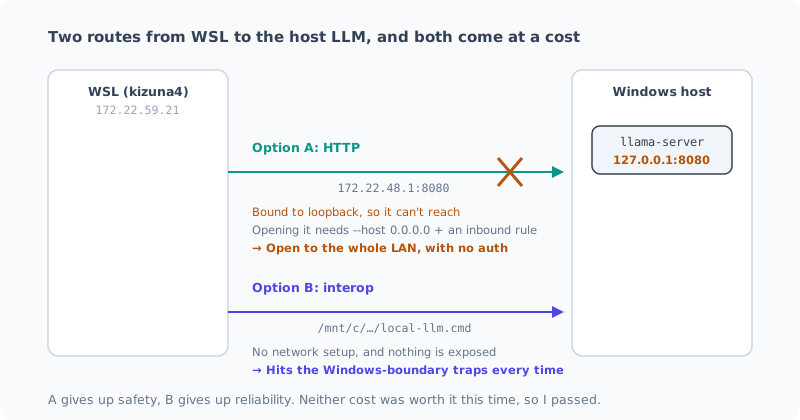
Option A: Connect over HTTP
Have it listen with --host 0.0.0.0, and call it over HTTP from WSL.
Put the existing CLI on the WSL side, and the adapter works almost as is.
Technically, this is the straightforward one. From WSL it’s just a remote API, with no character encoding or path issues. It’s better for speed, too.
There were two problems.
The first is that the IP changes. The gateway IP changes when WSL restarts,
so you need something to resolve it every time. Switching to mirrored mode in .wslconfig
makes it reachable at localhost, but then you’re changing the entire network setup.
Changing WSL’s network mode just to use an LLM isn’t a fair trade.
The second is the real one: what 0.0.0.0 means. It means anyone on the same LAN
can call it. llama-server has no authentication.
If I only used it on my fixed home LAN, it would probably be acceptable. But even though it’s a mini PC, I might take this machine out. The moment it connects to Wi-Fi at a café or a client’s office, I’d be opening an unauthenticated LLM endpoint to everyone on that network.
The scary part about “just stop it when I take it out” is that if I forget, I won’t notice. It just sits there open quietly, with no errors or anything.
Option B: Call the Host Command through interop
The adapter on the WSL side launches /mnt/c/Projects/local-llm/bin/local-llm.cmd directly.
No network setup at all, and the host stays on 127.0.0.1. Nothing is exposed.
The safety problem goes away. But a different problem comes in.
Throughout this work, every time I crossed the Windows boundary, I ran into something unexpected.
| Trap I hit | What happened |
|---|---|
.cmd character encoding | I wrote Japanese in a REM line, and cmd.exe interpreted the mangled bytes as a command |
| Store Python | For %APPDATA%, the path string was the same, but reads and writes actually went somewhere else. The same file looked like 0 bytes and 705 bytes |
| cp932 when piped | When stdin/stdout are pipes, they aren’t UTF-8 and Japanese text breaks (flagged in a review and fixed) |
Option B means piping a 19,000-token diff across this boundary on stdin. I’d be sending the biggest load through the very place that tripped me up three times in a row.
I’m not saying it won’t work. But it’s obvious that finding the cause when it doesn’t work will be expensive. And every failure so far had been the “breaks quietly” kind.
Why I Passed
Here’s how it sorts out:
| What you give up | ||
|---|---|---|
| Option A | Safety | Left open without authentication wherever I take it |
| Option B | Reliability | The biggest load goes through a boundary I’ve already tripped on three times |
Then I looked again at what I’d get.
- The local LLM’s hit rate as a reviewer, in my latest measurement, was 1 out of 6
- The other 5 were rejected, and several were the “raises a guess as a defect” kind
- On the WSL side, the Claude and Codex reviewers already work fine
In other words, what I’d be taking the risk to connect is still just a supporting third reviewer. If its hit rate were on par with the commercial models, it would be a different story, but right now it isn’t.
It just came down to this: “doing it because I can” and “doing it because it’s worth it” are different things.
When I Would Do It
If I do it in the future, I think it’ll be when one of these changes.
When option A would work — if this becomes a stationary machine that never leaves the house, or if I put a reverse proxy with authentication in front of llama-server. The latter adds another layer to the setup, so only once I’m using it often enough to justify that.
When option B would work — if the local LLM’s hit rate goes up and it becomes worth taking on the boundary hassle.
Both are “not yet”, not “never”.
Summary
- Windows host commands can be run from WSL (interop works)
- There are two routes, HTTP and interop, to the host LLM. Both are feasible
- But A opens it to the LAN with no authentication, and B takes on the instability of crossing the boundary
- What you get is “a third reviewer with a 1/6 hit rate”. It isn’t worth it, so I passed
Even though the result of the investigation was “don’t do it”, it was worth investigating. If you’ve put the reasons for not doing it into words, you can decide again when conditions change. If you just vaguely never got around to it, six months later you’ll be researching from the same starting point again.
Next, I’ll keep running the three-reviewer setup on real development and watch how the local one’s hit rate moves. The decision in this post could change depending on those numbers, too.
Related Posts
Reviewing Confidential Code with AI Without Sending It to the Cloud (Local LLM × dev-orchestra)
How I review code that can't leave the company without sending it to a cloud AI. I register a local LLM as a dev-orchestra reviewer, use only the local model for confidential code, and combine it with cloud AI for code that can be shared. I also cover how good the local LLM's reviews really are, and the pitfall where a single choice of how you invoke it sends your code out anyway.
How I Made the Local LLM on My Ryzen AI PC 7 Times Faster (llama.cpp + Vulkan + Qwen)
I rebuilt the local LLM setup on my freshly wiped Ryzen AI 9 HX 370 machine with llama.cpp and Vulkan: about 7 times faster than CPU inference. Here's how picking the newest model backfired, and measurements showing the bigger file was faster.
Wiping the Local LLM Setup on My Ryzen AI PC Clean
To rebuild the local LLM setup I had piled up on my AMD Ryzen AI 9 HX 370 machine with the latest approach, I'm deleting it all first. I cover taking inventory of what's left, the removal steps, and what you shouldn't delete.