Introduction
Over this series I’ve been rebuilding my local LLM environment, but there’s one part I’ve never touched: the NPU.
The Ryzen AI 9 HX 370 has an XDNA2 NPU, advertised at 50 TOPS. Ever since I chose Vulkan (the iGPU) in part 2, the NPU had been left completely untouched.
Since it’s there anyway, I looked into whether I could use it. The conclusion: I didn’t use it. I stopped right after downloading the installer.
The Hardware Is Fine
First, I checked:
NPU Compute Accelerator Device   Status: OK
ドライバ: AMD 32.0.20102.3930(2026年5月7日)
No problems with the device or the driver. Whatever keeps me from using it, it isn’t the hardware.
Wall 1: llama.cpp Has No NPU Backend
This was the first wall.
The llama.cpp I’m using has no way to drive the NPU at all. There’s Vulkan, ROCm, CUDA, and CPU, but no backend for XDNA2. (There seems to be a community fork for XDNA1, but mine is XDNA2.)
So to use the NPU, I’d need to replace my current stack with something else entirely.
The Option: FastFlowLM
The option that came up for running LLMs on the NPU was FastFlowLM. It’s a runtime dedicated to Ryzen AI NPUs, distributed from AMD’s GitHub organization (ROCm).
- Supports the whole XDNA2 lineup (Strix / Strix Halo / Kraken / Gorgon Point)
- Has an OpenAI-compatible API
- Up to 256k context
- 30 MB MSI on Windows
The OpenAI-compatible API was important. It means the reviewer setup I built in part 3 could be reused almost as is.
And when I looked at the model catalog, my hopes went up.
Qwen3.6-35B-A3B is listed. It’s the very model I’m using as my main one.
Wall 2: No Guarantee It Runs on My Chip
Being in the catalog and running on my own chip turned out to be two different things.
The published benchmarks only cover the Ryzen AI 7 350 (Kraken Point) and the Ryzen AI MAX+ 395 (Strix Halo). My HX 370 (Strix Point) isn’t included.
And when I searched, I found this issue:
Support Qwen3.6-35B-A3B on Ryzen AI HX 370 / XDNA2 (#547) Label: model request Opened May 13, 2026, no response from the maintainers
No movement for more than 4 months.
NPU models need an xclbin (circuit configuration) for each chip.
In this world, you can’t assume it’ll run just because it’s the same XDNA2.
Wall 3: Even If It Ran, It’d Be Slower Than the iGPU
Supposing it did run, I checked whether it would be any faster.
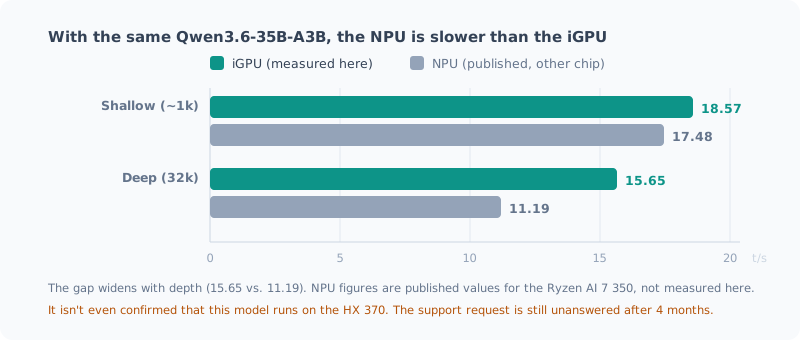
| Depth | iGPU (measured on this machine) | NPU (published values for the Ryzen AI 7 350) |
|---|---|---|
| Shallow (~1k) | 18.57 | 17.48 |
| Deep (32k) | 15.65 | 11.19 |
The iGPU is faster. And the gap widens with depth.
On top of that, reports from Strix Halo said there’s a fixed TTFT (time to first token) of about 2.7 seconds on every request. In a conversation, you feel that directly.
To be clear, the NPU numbers aren’t measurements on my chip. But it’s certain that the numbers aren’t pointing in a promising direction.
Wall 4: Its Biggest Advantage Doesn’t Apply to Me
This was the deciding factor.
What FastFlowLM puts front and center is not speed but power efficiency.
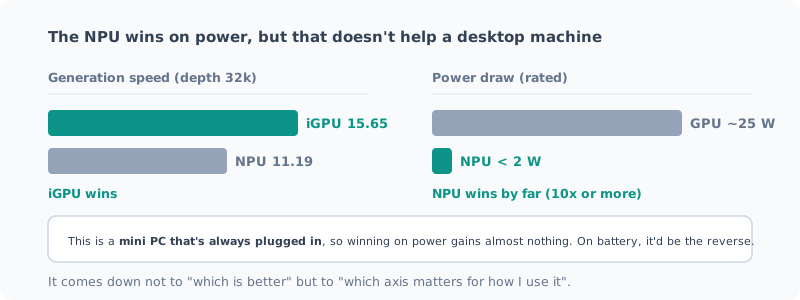
< 2 W (CPU + NPU combined), over 10x the efficiency of a GPU at about 25 W
That’s a real strength. A difference of more than 10x isn’t noise. If you want an LLM always running on a battery-powered laptop, there’s probably no other choice.
But mine is a mini PC that’s always plugged in. For a machine sitting on a desk, connected to power, the difference between 2 W and 25 W is worth almost nothing.
The axis it wins on doesn’t matter for how I use it. That’s all there is to it.
I Downloaded the Installer, Then Stopped
After all that research, I thought “it’s worth confirming that it doesn’t work”, and downloaded the installer.
| Item | Result |
|---|---|
| Source | Official ROCm/FastFlowLM release on GitHub (HTTPS) |
| Size | 30,491,316 bytes — exactly matches the value reported by the API |
| Authenticode signature | None |
It wasn’t signed.
It came from AMD’s GitHub organization, the size matched, and there were no signs of tampering. Unsigned releases aren’t unusual in OSS.
Even so, I stopped here. What I’d gain wasn’t worth it.
Even if it ran, it would be slower than the iGPU, and the power advantage doesn’t apply. So all this test could give me was either “confirmation that it doesn’t run” or “confirmation that it runs but I won’t use it”. For that, I had no reason to install a binary whose signature I couldn’t verify.
I deleted the downloaded file, and I haven’t changed anything in my environment.
When I Would Do It
I don’t think it’s “never”. If conditions change, I’ll do it.
When llama.cpp gets an XDNA2 backend — if I don’t have to replace my stack, the cost of trying drops sharply.
When the HX 370 gets official support — if issue #547 is resolved, the biggest uncertainty, “no guarantee it runs”, goes away.
When I start using a battery-powered machine — the 10x difference in power efficiency becomes real value as is.
When I want to run the NPU and the iGPU side by side — run the 35B on the iGPU while the NPU handles light classification or summarization at the same time. That’s not “solving a current problem” but “creating a new way of using it”, so only once I need it.
Summary
- The NPU hardware and driver are fine. Whatever keeps me from using it, it isn’t the hardware
- llama.cpp has no NPU backend, so it’s out of reach from my current stack
- FastFlowLM makes it possible, but the support request for the HX 370 has been unanswered for 4 months
- Even if it ran, it would be slower than the iGPU (15.65 vs. 11.19 at 32k depth)
- The NPU’s strength is power efficiency (10x or more). It’s real, but it doesn’t help a desktop machine
I started looking into this thinking “it’s a waste to have 50 TOPS and not use it”, but what’s actually wasteful isn’t leaving it unused; it’s spending time on a tool that doesn’t fit.
The performance on a spec sheet and the performance that matters for how you use it are different things. On this machine, memory bandwidth decides everything, and that’s not the axis the NPU competes on.
Related Posts
How I Made the Local LLM on My Ryzen AI PC 7 Times Faster (llama.cpp + Vulkan + Qwen)
I rebuilt the local LLM setup on my freshly wiped Ryzen AI 9 HX 370 machine with llama.cpp and Vulkan: about 7 times faster than CPU inference. Here's how picking the newest model backfired, and measurements showing the bigger file was faster.
Wiping the Local LLM Setup on My Ryzen AI PC Clean
To rebuild the local LLM setup I had piled up on my AMD Ryzen AI 9 HX 370 machine with the latest approach, I'm deleting it all first. I cover taking inventory of what's left, the removal steps, and what you shouldn't delete.
How Much Memory Does a Local LLM Need? Measured on a Mini PC with 96GB
I ran a local LLM on a Ryzen AI mini PC with 96GB of memory and measured how many GB it actually uses. A 35B MoE model takes 24GiB, and even with the context stretched to its 256K limit, it stays around 28GiB. I sort out what 32GB, 64GB and 96GB are each likely to handle, keeping measurements and estimates apart.