I Measured Whether Turning Off Thinking Was OK, and It Was My Grader That Broke Twice
Introduction
In the post where I set up the CLI, I turned thinking off by default. Here’s the reason I gave:
This eats a lot of tokens. For the question “Introduce yourself in one sentence in Japanese”, it used 1313 characters on thinking.
I only looked at speed. I never measured whether quality dropped. The possibility that turning it off was costing me something was still open.
So I measured it. The conclusion was “at this difficulty level, turning it off is fine”, but on the way there I hit bugs in my grading script twice. That turned out to be the real takeaway.
Deciding How to Measure
If I graded quality by gut feeling, there’d be nothing to compare. So I decided to use only tasks whose answers can be checked mechanically.
I can’t measure “does the explanation get more careful”, so I decided not to measure it. I think pretending to measure something you can’t measure does more harm.
There are 5 tasks. I mixed tasks where thinking should help with ones where it shouldn’t.
| Task | Type | Expectation | Answer |
|---|---|---|---|
| T1 | Multi-step arithmetic (bulk discount) | Should help | 1800 yen |
| T2 | Counting (inclusion–exclusion) | Should help | 53 |
| T3 | Date arithmetic (across months) | Should help | 2026-11-10 |
| T4 | Simple extraction (second-largest value) | Shouldn’t help | 7 |
| T5 | Unit conversion (seconds → h/m/s) | Shouldn’t help | 2 h 46 min 40 s |
I verified every answer by calculation.
Mixing in the “shouldn’t help” tasks is the key. If a difference showed up on every task, that would point not to thinking but to some other factor (temperature, a run of luck), which gives me a way to separate the two.
In the previous post I learned that “the more plausible the explanation, the more dangerous it is”, so I built in the possibility of my hypothesis being wrong from the start.
Conditions: temperature 0, max_tokens 4096, two runs per condition.
Round 1: Thinking OFF Is More Accurate?
Here’s what I got:
ON   正答 4/5
OFF  正答 5/5
On T2 (counting), only thinking ON was wrong. It thought for a whole 4171 characters and still got it wrong.
A storyline came to mind: “it overthought and tripped itself up”. An interesting result.
Just in case, I looked at the actual output:
3または5で割り切れる数は 33 + 20 - 6 = 47個です。
したがって、3でも5でも割り切れない数は 100 - 47 = 53個となります。

答え: 53個
It was correct. It used inclusion–exclusion properly. What was wrong was my grading.
Bug 1: What Got Graded Depended on the Condition
I was running a regular expression over the whole response.
With thinking on, the response lists the intermediate steps: 33, 20, 6, 47…. With thinking off, it returns just a short conclusion.
The same regex was looking at completely different amounts of text. Only the ON side was exposed to extra numbers, so the grading wasn’t fair.
I changed it to grade only the line starting with “答え:” (Answer:). Since I tell the model the output format, this has the side benefit of also measuring whether it follows the format.
Round 2: Now Both Are Wrong
After the fix I measured again, and T2 was wrong under both conditions.
Even though OFF had been right the previous time. Clearly something was off.
Bug 2: \b Doesn’t Work with Japanese
My regex used \b53\b.
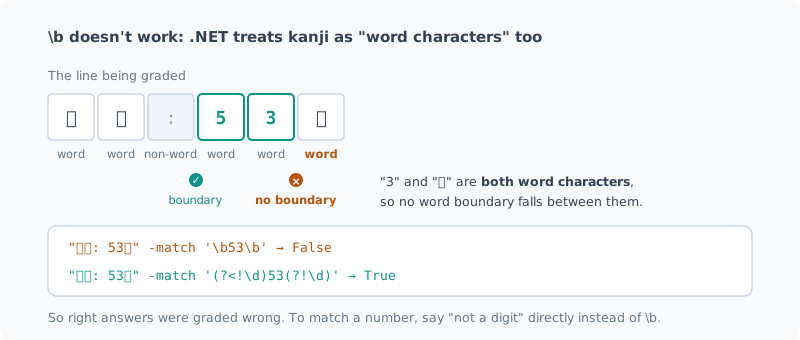
\b matches “the border between a word character and a non-word character”.
And .NET regular expressions treat kanji and kana as “word characters”.
In “53個”, the 3 and the 個 are both word characters, so there’s no boundary between them.
"答え: 53個" -match '\b53\b'          # False
"答え: 53個" -match '(?<!\d)53(?!\d)'  # True
So I had been recording correct answers as wrong.
If you want to fence off a number, instead of \b,
writing “not a digit before or after” directly is the reliable way.
This Time I Tested the Grader First
On the third round, before measuring, I tested the grader itself.
Does it pick up correct answers?
答え: 1800円        -> True
答え: 1,800円       -> True
答え: 53個          -> True
答え: **7**         -> True
答え: 2時間46分40秒 -> True
Does it reject wrong ones?
答え: 47個    -> False
答え: 9       -> False
答え: 1700円  -> False
Only after checking both against real strings did I run the actual measurement.
The Final Results
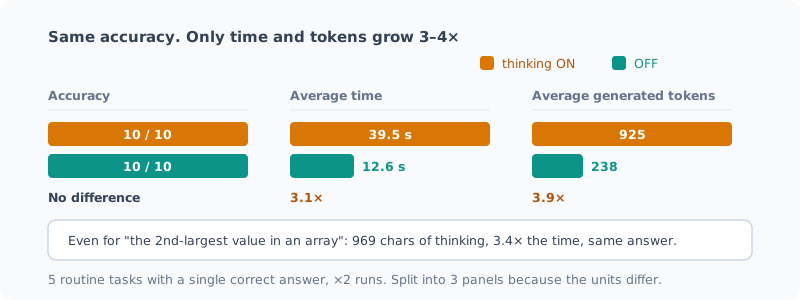
| Correct | Avg time | Avg tokens | Thinking | |
|---|---|---|---|---|
| thinking ON | 10/10 | 39.5 s | 925 | 1,931 chars |
| thinking OFF | 10/10 | 12.6 s | 238 | 0 |
Same accuracy. 3.1× the time, 3.9× the tokens.
Broken down by task, the time difference was consistent.
| Task | Type | ON | OFF | Time ratio |
|---|---|---|---|---|
| T1 | Multi-step arithmetic | 26.6s / 508tok | 9.0s / 145tok | 3.0× |
| T2 | Counting | 74.4s / 1762tok | 21.8s / 454tok | 3.4× |
| T3 | Date arithmetic | 44.7s / 1028tok | 13.1s / 249tok | 3.4× |
| T4 | Simple extraction | 19.0s / 444tok | 5.6s / 78tok | 3.4× |
| T5 | Unit conversion | 34.9s / 864tok | 13.4s / 261tok | 2.6× |
Even on T1–T3, where I expected thinking to help, accuracy didn’t go up. Both got every question right.
T4 says it all. Just to answer “the second-largest value in the array [3, 7, 2, 9, 4]”,
it thought for 969 characters and took 3.4× as long. The answer was the same 7.
What This Conclusion Does and Doesn’t Show
What it shows: turning thinking off in the CLI was the right call at this difficulty level. The benefit wasn’t worth the cost.
What it doesn’t show: every task this time had “a single correct answer and a routine procedure”. Harder problems might show a difference. I haven’t measured that range.
I made it possible to turn it on per request with llm -Think "...",
so I can still “add it only when something looks hard”.
Lesson: Suspect the Measuring Instrument First
In the previous benchmark post I wrote “when you find a difference, first check the variance of your measurement setup”. Right after that, I hit bugs in the measuring instrument itself, twice.
What the two had in common was that the first result was “interesting”.
- The first time: “thinking overthinks and trips itself up”
- The second time: “the problem was so hard that both got it wrong”
Both were storylines that could make a post, and that made them harder to doubt. What saved me was that both had something physically or logically wrong with them. An output that solves inclusion–exclusion correctly can’t be a wrong answer.
Before trusting the measurement, check that the measuring instrument is right. This time, that cost a few minutes. Measuring three times over cost far more.
Summary
- Turning thinking off was the right call at this difficulty level (same accuracy)
- But thinking uses 3.1× the time and 3.9× the tokens. For routine tasks, it’s hardly worth paying for
- I haven’t measured the difference on hard problems. I keep the option to switch it on
\bdoesn’t work with Japanese. .NET treats kanji and kana as word characters- Test the grader before the real run. Both whether it picks up correct answers and whether it rejects wrong ones
What I wanted to measure was the effect of thinking, but what I learned most about was how far I could trust my own grading script.
Related Posts
Making a Local LLM Part of My Daily Terminal Use
Making it fast wasn't enough to get me to use it. How I got to the point where typing `llm` after booting the PC returns an answer, a way to give back 22.7GB when idle, and a bug that was needlessly taking up 48GB.
I Had Three AIs Review 1418 Lines I Wrote, and They Found 11 Real Bugs
I had three reviewers, Claude, Codex and a local Qwen, review scripts I had written and been running myself. Three were bugs I couldn't have found on my own, and one was in the very script that tallies the review results. There was also a defect all three missed.
Dropping an Unused Image Feature Saved 1 GiB of Memory and Didn't Change Speed
My local LLM server was loading the image mmproj on every start, even though I only use text. I measured whether dropping it makes things faster, following the checklist from my previous post. In the first run the drift during measurement was too large to say anything about speed, and it turned out another AI session was running in the background, so I stopped it and measured again. Memory went down by 1 GiB, and speed stayed the same, within 3%. I made dropping it the default.