I Stretched the Context to 128K, and the Wall Was Waiting Time, Not Memory
Introduction
In the previous benchmark, I only measured up to a depth of 32K. The Qwen3.6-35B-A3B I use can handle up to 262,144 tokens. That means I had only checked one eighth of it.
Before measuring, I formed a hypothesis:
Stretching to 128K will bloat the KV cache and run out of memory. If so, the KV quantization I rejected in part 2 becomes mandatory, and that decision turns “conditional”.
To give away the result: the hypothesis was wrong. But the reason it was wrong was the more interesting story. And the real wall was somewhere else.
First, Does 128K Even Fit?
Before starting hour-long measurements, I checked in a single run only whether it works at all.
llama-bench -hf unsloth/Qwen3.6-35B-A3B-MTP-GGUF:UD-Q4_K_XL
            -ngl 99 -fa 1 -b 8192 -p 0 -n 128 -d 131072 -r 1
tg128 @ d131072 → 10.05 t/s (所要 18.4 分)It ran. But one run of one condition took 18 minutes. Had I jumped straight into a real run of 4 conditions × several repetitions, a crash would have cost me hours.
Memory: 28 GiB Even at the 256K Maximum
I started llama-server changing only -c, and compared actual memory use.
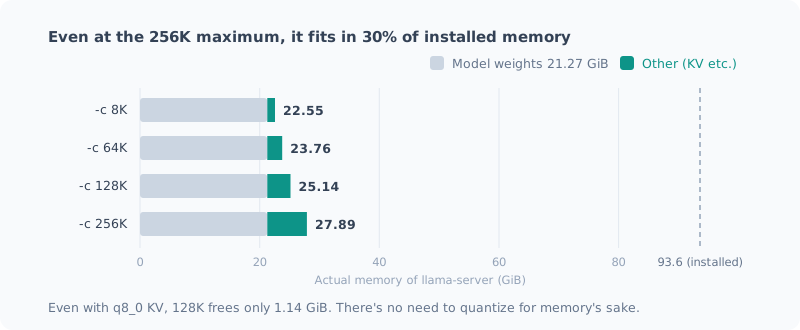
-c | KV | Actual memory | Increase from 8K |
|---|---|---|---|
| 8,192 | f16 | 22.55 GiB | — |
| 65,536 | f16 | 23.76 GiB | +1.21 GiB |
| 131,072 | f16 | 25.14 GiB | +2.59 GiB |
| 131,072 | q8_0 | 24.00 GiB | +1.45 GiB |
| 262,144 | f16 | 27.89 GiB | +5.34 GiB |
Starting it at the model’s 256K maximum takes 28 GiB. That’s 30% of the 93.6 GiB installed.
Switching KV to q8_0 frees 1.14 GiB at 128K. On this machine there’s no reason to quantize for memory. The hypothesis was wrong.
Why Is the KV So Small?
2.6 GiB of KV for 128K is far too small compared with a typical setup. I read the GGUF metadata:
qwen35moe.block_count             = 41
qwen35moe.full_attention_interval = 4
qwen35moe.ssm.state_size          = 128
qwen35moe.attention.head_count_kv = 2
qwen35moe.attention.key_length    = 256
qwen35moe.attention.value_length  = 256
full_attention_interval = 4 and ssm.* were the answer.
This model is a hybrid of SSM (state space model) and full attention.
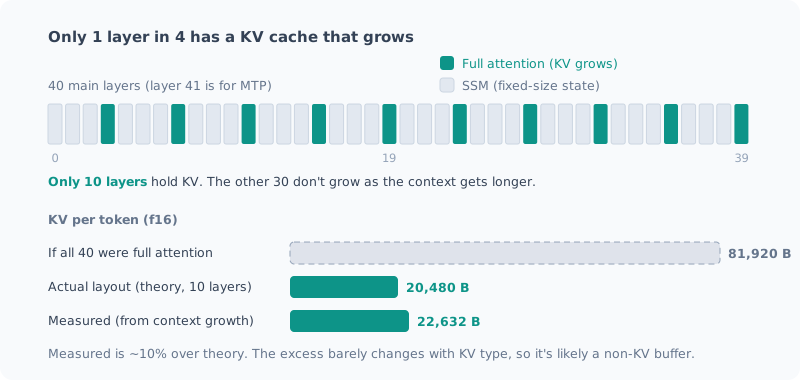
Only full attention layers have a KV cache that grows in proportion to the context. SSM layers hold a fixed-size state that doesn’t grow no matter how many tokens they read.
Full attention is 1 layer in 4, so 10 of the 40 main layers. The theoretical value is:
10 層 × (K + V) × 2 ヘッド × 256 次元 × 2 バイト = 20,480 B/tokenIf all 40 layers were full attention, it would be 81,920 B/token, 4 times as much. It’s not that “the KV is small”; it’s that “only a quarter of the layers have KV at all”.
Double-Checking Caught My Own Mistake
At first I almost wrote that the measurement and the theory “agreed within 3%”.
When I double-checked, I had been comparing the measurement in GiB (2³⁰) with the theory in 10⁹ bytes. With the units aligned, it looks like this:
| KV | Theory | Measured | Excess |
|---|---|---|---|
| f16 | 20,480 B | 22,632 B | +2,152 B |
| q8_0 | 10,880 B | 12,670 B | +1,790 B |
It wasn’t a match; it was about 10% over.
That said, the excess is nearly constant (about 2 KB/token) regardless of the KV type. It looks like there’s a buffer, separate from KV, allocated in proportion to the context length. I haven’t checked what’s in it. The structural explanation itself doesn’t change.
Generation Speed: Just Over 40% Slower at 128K
I measured generation speed across depths (f16, within one launch, 2 runs each). These are the values from the final measurement with interrupt monitoring, described below.
| Depth | tg128 | vs. depth 0 |
|---|---|---|
| 0 | 17.38 | — |
| 32,768 | 14.77 | −15% |
| 131,072 | 9.72 | −44% |
Even stacked up to 128K, it still puts out just under 10 tokens per second. That’s a readable speed. The −15% at 32K also matched the −15.7% from the previous post.
Getting here took four rounds of measurement.
My Own Auto-Start Polluted the Measurement
The first real run swept 3 depths × 4 KV combinations within a single launch. It was sane up to a point, but in the second half values like these came out:
| K / V | Depth 0 | Depth 32K |
|---|---|---|
| q8_0 / q8_0 | 9.61 | 14.67 |
Depth 0, with an empty KV, was slower than with 32K stacked up. That’s physically impossible.
When I checked the processes, llama-server had started in the middle of the measurement (26 GB).
It was started by serve.ps1: the mechanism I built in the CLI post
that “automatically starts the server if it’s stopped when I run llm”.
llama-bench   25.21 GB
llama-server  26.07 GB   ← 13:51 に割り込み
コミット      109.9 / 111.3 GB
A convenience feature I built myself had polluted my own measurement.
Last time I wrote “sweep comparisons within a single launch”. That’s still right, but if something interrupts from outside, even a comparison within one launch doesn’t hold.
From the second run on, I ran a monitoring job alongside that logged every 10 seconds whether llama-server had appeared.
KV Quantization: At 128K, Quantizing Only K Is Faster
This is the second run, with monitoring (depth 128K, 2 runs each).
| K / V | Depth 0 | Depth 128K |
|---|---|---|
| f16 / f16 | 17.13 | 9.90 |
| f16 / q8_0 | 17.71 | 9.37 |
| q8_0 / f16 | 18.79 | 11.51 |
| q8_0 / q8_0 | 18.72 | 10.44 |
Quantizing only K (q8_0 / f16) was the fastest, +16% over f16.
Here I stopped. The depth-0 values were rising in the order they ran.
17.13 → 17.71 → 18.79 → 18.72At depth 0 the KV type shouldn’t matter. This is drift over time, and q8_0 / f16, measured later, may have benefited from it.
So for the third run I reversed the order and measured q8_0 / f16 first.
| Order | K / V | Depth 0 | Depth 128K |
|---|---|---|---|
| First | q8_0 / f16 | 18.69 | 11.30 |
| Second | f16 / f16 | 18.58 | 10.65 |
Even in the unfavorable first slot it was +6.1%. The difference is real; the +16% had been inflated by the order.
Then in the fourth run (the final measurement described below) I sandwiched it: f16 → q8_0 → f16. If the first and last f16 agree, I can say nothing drifted in between.
| Order | K | Depth 0 | Depth 32K | Depth 128K |
|---|---|---|---|---|
| 1 | f16 | 17.16 | 14.75 | 9.65 |
| 2 | q8_0 | 17.45 | 15.06 | 10.75 |
| 3 | f16 | 17.59 | 14.79 | 9.79 |
The f16 values at 32K agree at 14.75 and 14.79. This run didn’t drift.
Here’s the gain or loss from quantizing only K:
| Depth | Measurement | q8_0 for K only |
|---|---|---|
| 32K | Previous post (5 runs each) | −3.5% |
| 32K | Run 4 (sandwiched) | +2.0% |
| 128K | Run 2 | +16% (inflated by order) |
| 128K | Run 3 (order reversed) | +6.1% |
| 128K | Run 4 (sandwiched) | +10.6% |
No difference at 32K, 6–11% faster at 128K. The ±3% at 32K is within the noise. Quantizing V was a loss at every depth I measured (run 4 didn’t measure V).
So the decision from part 2 did become “conditional”, but for a different reason than I expected. It’s about speed, not memory, and only at depths beyond 100K.
The Real Wall: 21–24 Minutes Just to Read 128K
Generation speed was still at a readable level. The problem comes before that.
I actually sent 32K / 64K / 128K prompts to the real server and measured how long it took to ingest them. Twice, at different times of day.
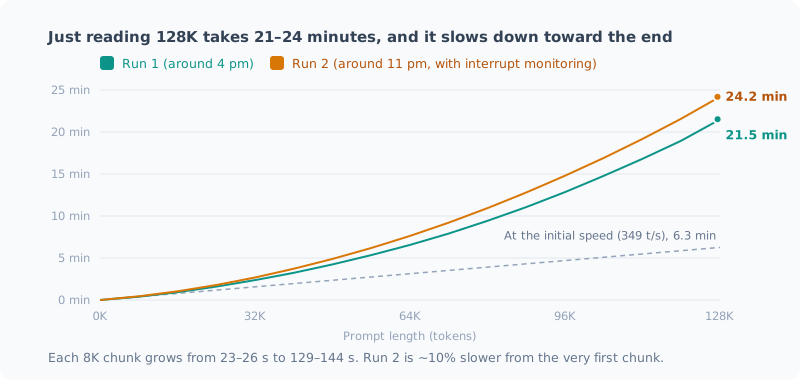
| Prompt | Run 1 (around 4 pm) | Run 2 (around 11 pm) |
|---|---|---|
| 32K | 149 s (2.5 min) | 167 s (2.8 min) |
| 64K | 397 s (6.6 min) | 469 s (7.8 min) |
| 128K | 1,291 s (21.5 min) | 1,451 s (24.2 min) |
Hand it a 128K document and it takes 21–24 minutes before the first character comes back.
Update (2026-09-27): When I measured a third time in the next post, the first read of 128K took 17.6 minutes. Across three runs that’s 17.6–24.2 minutes, a spread of nearly 40% with the same settings. Also, for the second and later questions about the same document, only the last 515 tokens had to be re-read, which took 10.7 seconds.
The progress log shows later chunks getting slower.
| Position | Time for that 8K (run 1) | (run 2) |
|---|---|---|
| 0 → 8K | 23.5 s | 26.1 s |
| 32K → 40K | 52.7 s | 62.5 s |
| 64K → 72K | 82.0 s | 95.1 s |
| 112K → 120K | 129.1 s | 143.7 s |
Each newly read token attends to every token before it. The time per chunk grows almost linearly, so the total grows close to the square of the length.
I also suspected MTP (speculative decoding) might be dragging it down, so right after run 1 I measured without it.
| Prompt | Ingestion (with MTP) | Ingestion (no MTP) | Generation (with) | Generation (without) |
|---|---|---|---|---|
| 32K | 149.1 s | 148.8 s | 16.23 t/s | 14.52 t/s |
| 64K | 397.4 s | 377.2 s | 13.77 t/s | 12.40 t/s |
Ingestion is almost the same. The slowness isn’t MTP’s fault; it’s the cost of attention itself. Generation with MTP was about 10% faster, the same trend as the effect I measured in part 2 (+12.6% on prose). But each was a single run, so a difference of around 10% is the same size as the run-to-run variation described below.
My Estimate Was Off Too
Before measuring, I had estimated “prefill for 131K takes about 6 minutes”. I had divided assuming the processing speed for short prompts (about 350 t/s) would hold all the way.
In reality it was 21–24 minutes. I was off by 3.4–3.8 times. The obvious lesson: don’t extrapolate a speed measured on short inputs to long inputs.
Was Anything Running in the Background? I Measured Again
After writing all this, something bothered me. The only thing I had been monitoring was llama-server starting. If some other process was using the CPU or GPU, that monitoring wouldn’t catch it.
In fact, the f16 values in run 1 looked suspicious.
| Run | Depth 0 | Depth 32K | Drop |
|---|---|---|---|
| Previous post (5 runs each) | 18.57 | 15.65 | −16% |
| This post, run 1 | 17.45 | 13.25 | −24% |
Because it had finished before the interruption, I had judged it “unaffected”, but the only basis for that was “llama-server hadn’t started yet”.
So I widened the monitoring. Every 10 seconds, it logs the CPU and GPU used by processes other than llama.
# 前回サンプルからの CPU 時間の差分を、プロセスごとに積む(llama-* は除外)
$pct = ($s - $prev[$p.Id]) / $dt / $ncpu * 100
# GPU はエンジンごとの使用率カウンタを pid で引き、llama 以外を合計
Get-Counter '\GPU Engine(*)\Utilization Percentage'
Run 4 was redoing everything, the benchmark (sandwiched f16 → q8_0 → f16) and the prefill, with this running alongside.
| Phase | Non-llama CPU (median / max) | Non-llama GPU (max) |
|---|---|---|
| Benchmark (70 min) | 6.6% / 11.5% | 4.7% |
| Prefill (37 min) | 6.6% / 8.9% | 4.2% |
Most of the 6.6% is the app I was using for this work itself, the same level as at rest before measuring (7.3%). Nothing was running in the background this time.
As a result, two things changed:
- The drop at 32K is −15%. It matches the previous post; the −24% in run 1 was the outlier. I couldn’t pin down the cause, but my judgment of “unaffected” was too lenient
- The gain from quantizing K at 32K is +2.0%. Together with the previous −3.5%, I should have read it as no difference
On the other hand, the values moved even without any interruption. Prefill was 12–18% slower than run 1, and uniformly slow from the very first 8K chunk. It doesn’t look like something cut in partway; I put it down to a difference in the state of the whole machine (heat or power).
Monitoring only protects you from what it watches. And even watching everything, around 10% still moves.
What to Do with the Settings
I’m not changing them.
| Item | Current | Decision |
|---|---|---|
-c | 65,536 | Keep. Memory-wise even 256K is possible, but ingesting 64K already takes 6.6–7.8 min |
| KV | f16 / f16 | Keep. Quantizing K only pays off beyond 100K |
What I send for code review is around 20,000 tokens. At that depth quantizing K doesn’t make it faster, so there’s no reason to change. Input on the order of 128K takes over 20 minutes just to ingest. Within interactive use, there’s no situation where I’d use 128K regularly.
If I ever want to “have it read a huge document overnight”,
I still have the option of starting it with -c 131072 -ctk q8_0 just for that.
Summary
- 128K works. Even at 256K, memory is 28 GiB, 30% of what’s installed
- Memory stays small because of the hybrid architecture. Only 10 of the 40 layers hold KV
- Generation speed is −44% at 128K (just under 10 tokens per second). Still readable
- Quantizing only K is 6–11% faster at 128K. No difference at 32K. Quantizing V is a loss
- The real wall is prefill. Ingesting 128K takes 21–24 minutes
- My own auto-start interrupted the measurement. Monitor the whole CPU and GPU, not just llama-server
- Even watching everything, around 10% moves from run to run
The hypothesis that turned out wrong was “it’ll run out of memory”. Because it was wrong, I got to see the model’s structure and the real constraint: waiting time.
Related Posts
I Thought My Benchmark Found an Effect, but It Was Measurement Noise
When I tried to verify a settings decision I'd made earlier, I got the opposite result. Just as I was about to celebrate, I noticed something physically odd, measured again, and the original decision was right. This is about why you shouldn't compare benchmarks from separate launches.
How to Benchmark a Local LLM (with a Checklist)
I put together the steps that make the results trustworthy when measuring the speed or quality of a local LLM. The same conditions vary by 10%, the order changes the result, background work causes 5x swings, and the grader is broken. This is a before, during and after checklist built from mistakes I actually made.
Local LLM Settings That Work and Settings That Don't (with Measurements)
I put the settings I tried for running a local LLM on a Ryzen AI mini PC on one page, ordered by how much they help. Vulkan gave 5.2x, MoE 5.7x. Some settings did nothing, some backfired, and some were never enabled in the first place. Every number was measured on this machine.