Can It Really Read All the Way into a 128K Document?
Introduction
In the 128K post, I had left it at this:
128K works. … All I’ve measured so far is speed.
Running and actually reading are two different things. Hand it a 130,000-token document: can it really pick up what’s written deep inside? Saying “supports 128K” without checking that was only half the story.
The previous post set me up to measure it. Once the document has been read, questions from the second one on come back in about 10 seconds. Before, every question needed a 20-minute read; now I can ask dozens of questions from a single read.
How I Measured
This is the so-called needle-in-a-haystack test.
- Haystack: this series’ work logs concatenated into one document (about 130,000 tokens)
- Needles: 20 sentences like “検証メモ: 備品番号 XA-4752 の保管棚は 2740 番です。” (“Test note: the storage shelf for equipment ID XA-4752 is number 2740.”), inserted at depths from 2.5% to 97.5% in 5% steps
- Questions: ask “What is the storage shelf number for equipment ID XA-4752?”, one at a time
- Traps: ask about 4 IDs that aren’t in the document, and see whether it can answer “not stated”
I added the traps because accuracy alone doesn’t reveal a habit of “making things up when it doesn’t know”. If it gives a plausible-looking number for an ID that doesn’t exist, that’s just as much a failure to read.
There are three conditions to compare.
| Condition | Purpose |
|---|---|
| 16K, f16 | Baseline. Can it answer everything when the document is short? |
| 128K, f16 | The main question. Does it drop when the document is long? |
| 128K, K as q8_0 | Does the setting that was 6–11% faster at 128K lose accuracy? |
The 16K baseline matters. When it gets something wrong at 128K, it lets me tell whether the length is to blame or the question just can’t be answered.
Pitfalls I Closed Off Before Measuring
In the thinking post, I hit bugs in my grading script twice. This time, before measuring, I closed off every pitfall I could think of.
| Pitfall | Countermeasure |
|---|---|
| Running a regex over the whole response and reacting to intermediate numbers | Look only at the “答え:” (Answer:) line |
\b doesn’t work with Japanese | Fence numbers with (?<!\d)2740(?!\d) |
| The answer number happens to appear in the original document | Search the document at run time and use only numbers it doesn’t contain |
| The script itself or the result files get mixed into the document | Exclude them from the document (if they get in, the answers are written in the document) |
| The PC sleeps during measurement | The script itself suppresses sleep |
The third and fourth can happen because I build the haystack from “this repository’s documents”. The result files contain every answer from the previous run. Mix those into the haystack and what I’m measuring is search, not memory.
Before the real run, I checked the grader against 12 strings.
OK  True  : 答え: 4821番
OK  True  : 答え: **4821** 番の棚です
OK  True  : 途中の説明 1482 | 答え: 4821番
OK  False : 答え: 1482番
OK  False : 答え: 48210番
OK  False : 4821番です(答えの行なし)
OK  True  : 答え: 記載なし
OK  False : 答え: 不明(3321番かもしれません)
……
採点器の検証: 12 件すべて期待どおり
I Still Hit One: It Was Cut Off Before the Answer
In a 16K trial run, exactly one question was marked wrong because “the answer line was empty”.
The grader had been verified. So what happened? My first script kept only the answer line, so I couldn’t tell. I changed it to keep the whole response when the answer is wrong and ran it again.
本文: 備品番号 AF-6519 に関する記述は、2つ目の記事「……」内の
「測り方をしくじった話」のセクションにあります。 記載
(It began explaining that “the description of equipment ID AF-6519 is in the section … of the second post”, and stopped mid-word.)
The model had started writing an explanation before the answer and was cut off at the max_tokens 64 limit.
I was the one stopping it before it reached the “答え:” line.
That way, I couldn’t tell whether retrieval had failed or it was cut off before writing. Raising the limit to 256, 16K got all 20 questions right.
Even with a verified grader, there was a hole in the stage before the grader. What helped was actually reading the responses that were marked wrong.
Results
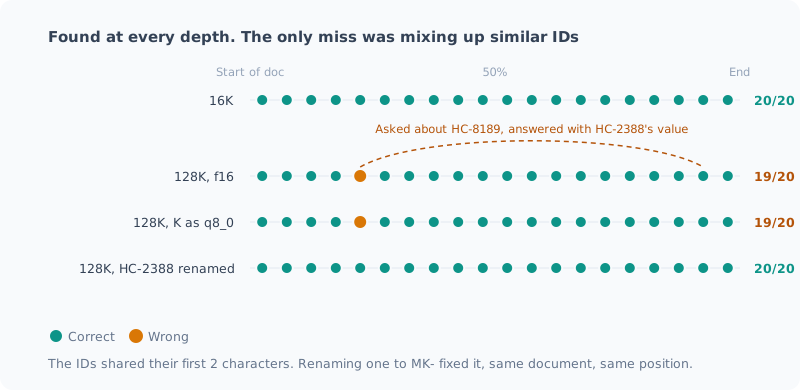
| Condition | Needles (20) | Not stated (4) | First read | Per question |
|---|---|---|---|---|
| 16K, f16 | 20/20 | 4/4 | 56 s | 3 s |
| 128K, f16 | 19/20 | 4/4 | 19.5 min | 11 s |
| 128K, K as q8_0 | 19/20 | 4/4 | 19.6 min | 12 s |
It found them at a depth of 2.5% and at 97.5% alike. I saw no tendency like dropping things around the middle of the document.
For the 4 IDs not in the document, it answered “not stated” under every condition. Zero made-up answers.
Quantizing K had no effect on accuracy. Even the answer to the one question it missed was exactly the same as with f16.
The Only Mistake Wasn’t About Depth
The one question it missed at 128K was the same under both conditions.
22.5% の位置  HC-8189 → 正解 2539   モデルの答え: 8953
92.5% の位置  HC-2388 → 正解 8953
(At 22.5%: HC-8189, correct answer 2539, model’s answer 8953. At 92.5%: HC-2388, correct answer 8953.)
The 8953 it answered is the value of a different ID somewhere else in the document. And that ID also starts with “HC-”.
It doesn’t look like it lost track of information deep in the document; it looks like it mixed up two similar IDs and answered with the later one (closer to the question). At 16K the same pair was answered correctly, so presumably this becomes more likely as the document gets longer.
Up to this point it’s a guess. To confirm it, I renamed only HC-2388 to MK-2388 and ran the same 128K again. I didn’t change the document, the positions or the values at all.
| Condition | Needles | Answer for HC-8189 |
|---|---|---|
| 128K, f16 | 19/20 | 8953 (HC-2388’s value) |
| 128K, HC-2388 renamed to MK-2388 | 20/20 | 2539 (correct) |
Just renaming it turned the answer correct. That confirms it was a mix-up.
But all I can say is “for this one pair”. Among the 20, this was the only pair that shared its first two characters.
There are other pairs that share only the first character (with X: XA / XY / XX; with W: WE / WP / WA; with H: HC-8189 / HP-1922 / HC-2388). Those weren’t mixed up (HP-1922 was answered correctly too). The only pair it confused matched up to two characters. There aren’t enough cases to generalize to “it always confuses similar IDs” or “it tends to answer with the later one”.
How to Use It
Even in a 128K document, it can pick up what’s written deep inside. At least for this kind of “look up a number” question.
What to watch out for is less the length and more when the document contains several things with similar names.
In code, the closest case would be functions like getUserById and getUserByIdOrNull in different places.
If you ask about similarly named things in a long document, it’s safer not to take the answer at face value and to check the relevant passage.
I learned that quantizing K is a setting that’s 6–11% faster at 128K without losing accuracy. But as I wrote in the 128K post, it isn’t faster at the roughly 20,000 tokens I normally use, so I haven’t changed the default settings.
What This Conclusion Can’t Tell You
- There’s only one kind of question. “Look up a number” is among the easiest kinds of retrieval; I didn’t measure questions that require cross-referencing several places, or tasks like summarization
- There are 20 needles per condition. One wrong answer moves the result by 5%, so I can’t speak to fine differences between conditions
- The haystack is this series’ work logs. Results might differ for documents of a different nature
Summary
- Even at 128K, 19 of 20 questions were right. I saw no drop-off by depth
- For things not in the document, it always answered “not stated”. No made-up answers
- The only mistake was mixing up a different ID that shared its first two characters. Renaming one of them made it go away
- Quantizing K has no effect on accuracy
- Even with a verified grader, there was a hole: the
max_tokenscutoff. I found it by reading the responses marked wrong
The answer to “can it read 128K?” turned out to be: yes, but it can mix up similar things.
Related Posts
Dropping an Unused Image Feature Saved 1 GiB of Memory and Didn't Change Speed
My local LLM server was loading the image mmproj on every start, even though I only use text. I measured whether dropping it makes things faster, following the checklist from my previous post. In the first run the drift during measurement was too large to say anything about speed, and it turned out another AI session was running in the background, so I stopped it and measured again. Memory went down by 1 GiB, and speed stayed the same, within 3%. I made dropping it the default.
Can a 128K Document Be Reused Without Reading It Again?
Having a local LLM read a 128K-token document takes over 20 minutes. To see whether later requests can be faster, I measured the prompt cache in 6 scenarios. Changing just the question takes seconds, but saving to disk and restarting means re-reading everything. The reason lies in the model's hybrid architecture. I also found a mistake in an earlier post.
I Stretched the Context to 128K, and the Wall Was Waiting Time, Not Memory
I stretched my local LLM's context from 32K to 128K and measured it. The memory shortage I expected never happened, and the reason lay in the model's architecture. The wall I hit instead was prompt ingestion time: just reading 128K takes 21–24 minutes. It also covers how my own auto-start polluted the measurements along the way.