Local LLM Settings That Work and Settings That Don't (with Measurements)
Introduction
Articles about speeding up local LLMs list a huge number of settings:
-b, -ub, -fa, KV cache quantization, speculative decoding, prompt caching…
When I actually tried them all, only a few made a real difference. Some did nothing, some made things slower, and some I thought I had turned on were disabled from the start.
Here are the results I measured through this series, on a single cheat sheet.
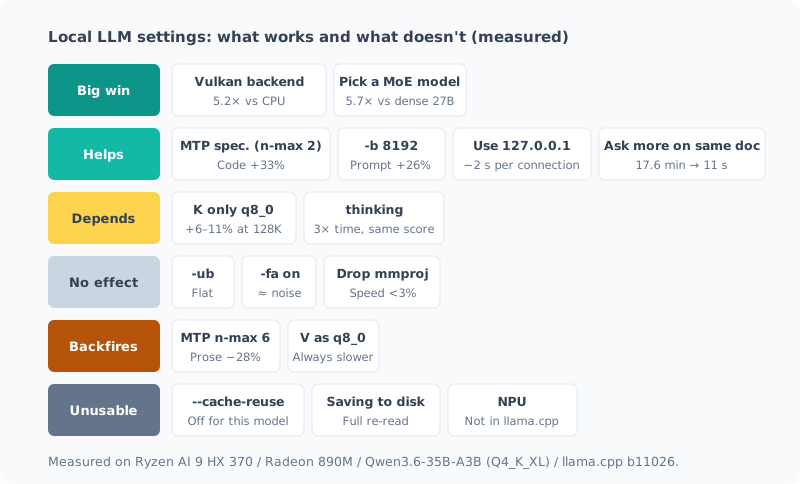
Environment: Ryzen AI 9 HX 370 / Radeon 890M (iGPU) / DDR5-5600 96GB / Windows 11 / llama.cpp b11026 (Vulkan) / Qwen3.6-35B-A3B (Q4_K_XL). Results may differ on other machines or models.
Big Wins: These Two Decide It
| Setting | Result | Details |
|---|---|---|
| Vulkan backend | Generation 5.2x CPU (2.59 → 13.41 t/s). 2.8x faster than ROCm (4.76 t/s) | Setup post |
| Choose an MoE model | 5.7x generation and 9.5x prompt processing compared with dense 27B | Same |
These two settle the speed almost entirely. Everything else adds 10-30% on top.
MoE is fast because it reads less data per token. On an iGPU, generation speed is set almost entirely by memory bandwidth, so the right way to pick a model is not by “total parameter count” or “file size” but by “how many bytes it reads per token”. That’s why the MoE model, whose file is 4.5 GB larger, was 5.7x faster than the dense model.
Helps: No Reason Not to Use
| Setting | Result | Details |
|---|---|---|
MTP speculative decoding (--spec-type draft-mtp --spec-draft-n-max 2) | Prose +12.6%, code +33.4%. Output is unchanged | Setup post |
-b 8192 | Prompt processing +26% (281 → 353 t/s). Slightly lower at 16384 | Same |
Connect to 127.0.0.1 | Per connection 2.1 s → 0.05 s. My own llm went from 5.3 s to 1.0 s | Below |
Stack questions on the same document (default --cache-prompt) | With a 128K document, 17.6 minutes the first time → 10.7 s for a different question | Cache post |
Connect to 127.0.0.1, Not localhost
This is the easiest one, and the easiest to miss.
On Windows, localhost resolves to IPv6 (::1) first.
llama-server only listens on IPv4 (127.0.0.1),
so the connection fails and you wait about 2 seconds until it falls back to IPv4.
| Target | PowerShell | Python |
|---|---|---|
localhost | 2.10 s | 2.29 s |
127.0.0.1 | 0.05 s | 0.03 s |
For a short question, most of the response time is this wait. Rewriting the URL on the client side makes it disappear.
My own llm command was still using localhost, so I fixed it and measured.
localhost | 127.0.0.1 | |
|---|---|---|
llm "1+1は?" (PowerShell) | 5.1-5.6 s | 1.0-1.2 s |
| CLI for dev-orchestra (Python) | 4.9 s | 0.8 s |
It got shorter by 4 seconds, not 2. Both tools connect twice, once to “check the server is running” and once to “send the question”, and each of those waited 2 seconds.
Stack Questions on the Same Document
Processing a long document is heavy: at 128K tokens it took 17.6-24.2 minutes. But if you ask a different question about the same document, only the last 515 tokens are processed again.
This is the work of --cache-prompt, which is on by default, so it works without any setting.
The trick is to put the document first and the question last. If you change the middle of the document, everything is processed again.
Situational: Worth It in Some Cases
| Setting | Result | Details |
|---|---|---|
q8_0 for K only (-ctk q8_0) | +6-11% at 128K. No difference at 32K (−3.5 to +2.0%). Accuracy unchanged | 128K post, reading quality post |
| thinking | Same accuracy on routine tasks, 3.1x the time and 3.9x the tokens | thinking post |
Quantizing K pays off only when handling long documents over 100K. At the usual 20K tokens or so it isn’t faster, so I don’t enable it by default.
With thinking, accuracy on routine tasks (arithmetic, dates, unit conversion) didn’t change; only the time tripled. I keep it off by default and turn it on only for questions that look hard. I haven’t measured yet whether it makes a difference on hard problems.
No Effect: Nothing Changes
| Setting | Result | Details |
|---|---|---|
-ub (micro-batch) | Flat anywhere from 512 to 2048 | Setup post |
-fa on (FlashAttention) | Speed within the noise | Same |
Drop mmproj (--no-mmproj) | Speed difference under 3%. Memory 1.1 GiB lower | mmproj post |
-b and -ub are often introduced as a pair, but only -b was doing anything.
mmproj is the component for reading images. If you only use text, you can drop it without trouble and free up 1 GiB of memory. It doesn’t make anything faster.
Backfires: Makes It Slower
| Setting | Result | Details |
|---|---|---|
| Raise MTP n-max (4, 6) | Prose −28% at n-max 6. Slower than no speculation | Setup post |
q8_0 for V (-ctv q8_0) | Slower at every depth I measured (−9.7% at 32K, −5.4% at 128K) | Benchmark noise post, 128K post |
Speculative decoding doesn’t get “faster the further ahead it guesses”. Wrong guesses are thrown away, so with hard-to-predict prose, more guessing means more wasted computation. 2 was optimal.
If you quantize the KV cache, do K only. Quantizing V too makes it slower.
Unusable: You Think It’s On, but It’s Disabled
| Setting | Result | Details |
|---|---|---|
--cache-reuse | Disabled from the start with this model. The startup log says not supported | Cache post |
| Saving and restoring slots to disk | Saving and restoring work, but after restoring everything is processed again | Same |
| NPU | llama.cpp has no NPU backend | NPU post |
This tier is the most dangerous one.
I had even written in a post that --cache-reuse was “working”.
In reality, the startup log said this, and it had been disabled from the start.
srv load_model: cache_reuse is not supported by multimodal, it will be disabledEven after dropping the image mmproj, it gets disabled again, this time with not supported by this context.
Qwen3.6-35B-A3B is a hybrid design with SSM layers, which doesn’t work with a mechanism that shifts and reuses the KV.
The same structure is why saving to disk doesn’t help either.
After Adding a Setting, Read the Startup Log
Finally, the biggest lesson I got from building this table:
Check the startup log to confirm a setting is actually enabled.
llama-server sometimes silently disables settings it can’t use.
There’s no error and it still starts, so unless you read the log, you won’t notice.
I didn’t notice for 4 days with --cache-reuse.
llama-server ... 2>&1 | Select-String 'not supported|disabled|ignor'The “Unusable” tier in this table is what I found that way.
Summary
- Speed is decided almost entirely by Vulkan (5.2x) and MoE (5.7x). The rest adds 10-30%
- Easy wins are MTP (n-max 2),
-b 8192, connecting to127.0.0.1, and document first, question last - K quantization and thinking depend on the situation. V quantization and a large n-max backfire
--cache-reuseis disabled with this model. Check your settings in the startup log
Related Posts
I Stretched the Context to 128K, and the Wall Was Waiting Time, Not Memory
I stretched my local LLM's context from 32K to 128K and measured it. The memory shortage I expected never happened, and the reason lay in the model's architecture. The wall I hit instead was prompt ingestion time: just reading 128K takes 21–24 minutes. It also covers how my own auto-start polluted the measurements along the way.
I Thought My Benchmark Found an Effect, but It Was Measurement Noise
When I tried to verify a settings decision I'd made earlier, I got the opposite result. Just as I was about to celebrate, I noticed something physically odd, measured again, and the original decision was right. This is about why you shouldn't compare benchmarks from separate launches.
How to Benchmark a Local LLM (with a Checklist)
I put together the steps that make the results trustworthy when measuring the speed or quality of a local LLM. The same conditions vary by 10%, the order changes the result, background work causes 5x swings, and the grader is broken. This is a before, during and after checklist built from mistakes I actually made.