How Much Memory Does a Local LLM Need? Measured on a Mini PC with 96GB
Introduction
When you buy a PC for local LLMs, the amount of memory is the hardest thing to decide. I put 96GB in my Ryzen AI 9 HX 370 mini PC, on the reasoning that more would be safer.
So how many GB does it actually use? I’ll sort it out from the numbers I’ve measured in this series.
To give the conclusion first, the 35B MoE model I use now takes 24–28 GiB. That’s about 30% of 96GB, and my view is that 64GB is plenty and 32GB is tight. However, the 32GB and 64GB parts are estimates, not measurements on this machine.
Measured: Memory Used by the Model
The model is Qwen3.6-35B-A3B (Q4_K_XL, a 21.27 GiB file).
With my usual settings (64K context, MTP speculative decoding on, no mmproj for images),
I measured how much llama-server uses.
| State | Usage |
|---|---|
| Right after startup | 23.97 GiB |
| After reading a 32K-token document | 24.89 GiB |
The model file is 21.27 GiB, so everything else (KV cache, the MTP area, working space) comes to about 3 GiB.
How Much It Grows with a Longer Context
I measured the growth with context length under different conditions (no MTP, with mmproj).
| Context | Usage | Increase from 64K |
|---|---|---|
| 8K | 22.55 GiB | −1.21 GiB |
| 64K | 23.76 GiB | — |
| 128K | 25.14 GiB | +1.38 GiB |
| 256K (the model’s limit) | 27.89 GiB | +4.13 GiB |
Adding these increases to the usual-settings value gives about 25.3 GiB at 128K and about 28.1 GiB at 256K (estimated).
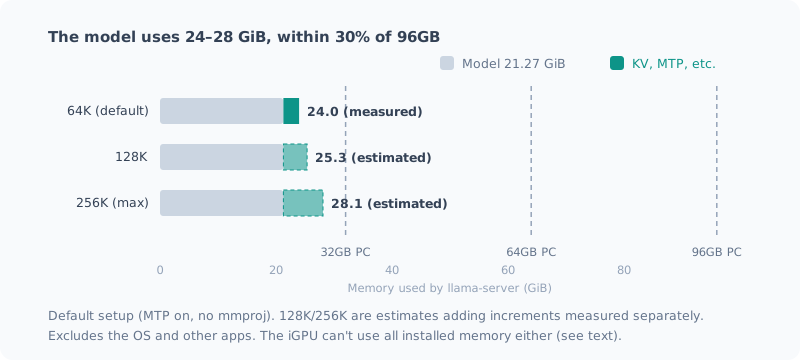
Even stretched to the 256K limit, it’s 28 GiB. It grows less than I expected.
The Small KV Cache Is a Trait of This Model
It’s common knowledge that the KV cache grows as the context gets longer. With this model, it grew by only about 22 KB per token (f16).
The reason is the model’s architecture. Qwen3.6-35B-A3B is a hybrid of SSM and full attention, and only 10 of its 40 layers hold a KV cache. A model with full attention in every layer would need around 4 times as much for the same context.
With other models, memory for long contexts could be much heavier. Treat “28 GiB even at 256K” as a number that holds because of this model (the 128K post).
The iGPU Uses Main Memory
The mini PC’s integrated GPU (Radeon 890M) has almost no dedicated memory.
| Item | Value |
|---|---|
| iGPU dedicated memory (BIOS setting) | 2 GiB |
| Memory visible to the OS | 93.6 GiB (of 96GB) |
| GPU shared memory in use while llama-server runs | 24.6 GiB |
| Usable amount reported by Vulkan | 76.9 GiB (78,739 MiB) |
The model isn’t in dedicated memory; it sits directly in main memory (shared memory). So the installed memory directly sets “how large a model you can load”.
However, the iGPU can’t use all of the installed memory. On this machine, 76.9 GiB of the 93.6 GiB (about 80%) was reported as usable. I haven’t checked how this ratio changes with the amount of memory or driver settings.
What You Can Do with 32GB / 64GB / 96GB
From here on, these are estimates. I base them on the measurements above and the assumption that “the OS and other apps also need several GB to a dozen or so GB”.
| Installed | This model (35B MoE, Q4) | Assessment |
|---|---|---|
| 32GB | Barely runs, if at all | 24 GiB for the model and KV. Add the OS and a browser and it easily runs short. If the iGPU can use 80%, that’s about 25 GiB, which is almost the limit. You’d likely need stronger quantization (a smaller file) or a smaller model |
| 64GB | Runs with room to spare | Even stretched to 256K it’s 28 GiB. No trouble using it alongside the OS and apps |
| 96GB | More than enough | This model uses only 30%. Larger models fit, but they don’t get faster (see below) |
For my use (this MoE model day to day, sometimes reading long documents), that means 64GB would have been enough.
More Memory Doesn’t Make It Faster
Finally, the most important point. The amount of memory only decides “whether it fits”, not how fast it runs.
iGPU generation speed is set almost entirely by how fast weights are read from memory (bandwidth). This machine has DDR5-5600 at 128-bit, 89.6 GB/s in theory and about 60 GB/s in practice.
Dividing by the amount read per generated token gives a rough idea of the speed.
| Model | Read per token | Generation speed (measured) |
|---|---|---|
| Qwen3.8-27B (dense) | All 16.23 GiB | 3.6 t/s |
| Qwen3.6-35B-A3B (MoE) | Only part (effectively 3B) | 20.7 t/s |
With 96GB, even a 70B-class dense model fits. But it would read around 40 GB per token, so on paper it puts out only 1–2 tokens per second. It fits, but it isn’t usably fast.
If you want speed, picking a model that reads less per token (MoE) does more than adding memory (the setup post).
Summary
- A 35B MoE model (Q4) uses 24 GiB of memory. Even stretched to the 256K limit, it’s about 28 GiB
- It grows little with long contexts because this model is a hybrid architecture. Other models can get heavy
- The iGPU uses main memory. But not all of it: about 80% on this machine
- My assessment: 64GB is plenty, 32GB is borderline (estimated)
- Memory only decides “whether it fits”. Speed is set by bandwidth and the model’s architecture
Related Posts
How I Made the Local LLM on My Ryzen AI PC 7 Times Faster (llama.cpp + Vulkan + Qwen)
I rebuilt the local LLM setup on my freshly wiped Ryzen AI 9 HX 370 machine with llama.cpp and Vulkan: about 7 times faster than CPU inference. Here's how picking the newest model backfired, and measurements showing the bigger file was faster.
The Complete Guide to Running a Local LLM at Usable Speed on a Ryzen AI Mini PC (2026 Edition)
All the steps to run a local LLM at around 20 tokens per second on a Ryzen AI 9 HX 370 (Radeon 890M) mini PC, in one post. Install the Vulkan build of llama.cpp, pick an MoE model, add only the settings that help, and end up able to just type llm. Every stumbling point I hit is included.
Why I Didn't Use the Ryzen AI NPU
I've been running local LLMs on a machine with a 50 TOPS NPU, but I've never used the NPU. When I looked into whether I could, I found there's no guarantee it runs, it's slower than the iGPU even if it does, and its biggest advantage doesn't apply to how I use it. A record of stopping right after downloading the installer.