Reviewing Confidential Code with AI Without Sending It to the Cloud (Local LLM × dev-orchestra)
Introduction
When you have an AI review your code, it finds bugs you’d never notice yourself. In the post where I had three AIs review my code, 11 real bugs came out of 1,418 lines I had written.
But there are situations where you can’t send code to a cloud AI.
- Work code, where a contract or company policy forbids sending it to outside services
- Code that handles personal data or sits close to credentials
- Code for a product that hasn’t been released yet
This post shows how to have an AI review even that kind of code entirely inside your own PC. I use a local LLM (Qwen3.6-35B-A3B) running on my mini PC, and dev-orchestra, a tool that splits a review across several AIs.
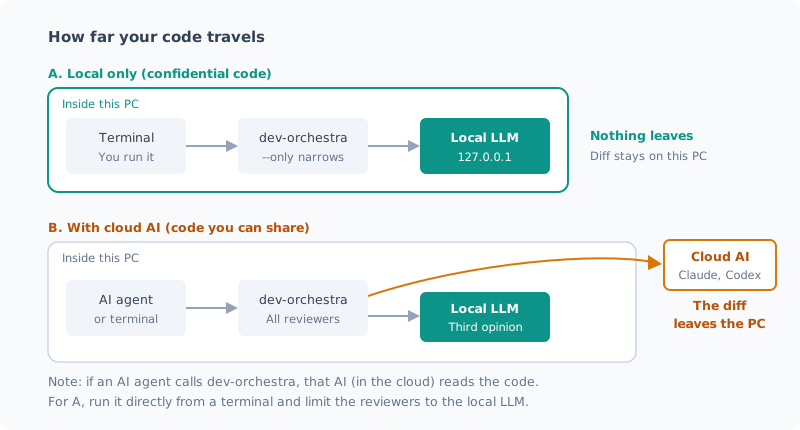
Approach: Keep Two Ways of Using It Apart
| A. Local only | B. Combined with cloud | |
|---|---|---|
| Suited to | Code that can’t leave the company | Code that can be shared |
| Reviewers | Local LLM only | Cloud AI + local LLM |
| Where the code goes | Only inside the PC | Also sent to the cloud |
| Findings | Fewer | More |
Confidential code gets A, everything else gets B. I set things up so one mechanism can switch between the two.
Setup
dev-orchestra’s “providers” are designed to wrap CLIs. There’s no way to call an API directly. So I put a thin CLI in between that just takes the prompt on standard input and returns the answer on standard output.
dev-orchestra
  └─ プロバイダ localllm(ユーザープロバイダとして登録)
       └─ local-llm.cmd → local-llm.py(stdin → API → stdout)
            └─ llama-server(127.0.0.1:8080、この PC の中)
dev-orchestra 0.9.0 added a way to add your own providers without touching the plugin itself (user providers). The adapter lives in dev-orchestra’s config folder, so it survives plugin updates. The details of building it are in the post where I added it as a reviewer. I rewrote the steps for writing an adapter from scratch on dev-orchestra 1.0.0 in the post where I connected my own agent.
Steps
1. Install the adapter and register it as a reviewer
The adapter (localllm.py) and the thin CLI that relays the prompt are explained in
the post where I added it as a reviewer.
Here I assume they’re already in dev-orchestra’s config folder (providers).
# アダプタを dev-orchestra の設定フォルダに入れる(私の環境ではインストーラを Python で書いた)
python integrations\dev-orchestra\install.py

# プラグインの場所(バージョン番号として比べて、いちばん新しいもの)
$P = (Get-ChildItem "$env:USERPROFILE\.claude\plugins\cache\dev-orchestra\dev-orchestra" -Directory |
      Sort-Object { [version]$_.Name } -Descending | Select-Object -First 1).FullName

# レビュアーとして追加し、名前とモデルを付ける
python "$P\scripts\dev_orchestra.py" reviewer add --provider localllm --role general
python "$P\scripts\dev_orchestra.py" reviewer list          # 追加された番号を確かめる
python "$P\scripts\dev_orchestra.py" reviewer set 3 --model qwen3.6-35b-a3b --id localllm-qwen
Replace the number in reviewer set with the one you see in reviewer list.
The installer is written in Python. If dev-orchestra runs on the Microsoft Store version of Python,
the Store version redirects %APPDATA% to a different location, so files copied with PowerShell are invisible to dev-orchestra.
If you write with the same Python that does the reading, the paths match whether or not redirection happens.
2. Review confidential code locally only, straight from the terminal
python "$P\scripts\dev_orchestra.py" review snapshot
python "$P\scripts\dev_orchestra.py" state record test ok
python "$P\scripts\dev_orchestra.py" review run --only localllm-qwen
The key is narrowing the reviewers with --only. If you forget it, the diff is sent to every registered reviewer, cloud AIs included.
The results are written to dev-orchestra’s merged file, and I read it myself to decide what to accept.
3. Review shareable code with everyone
python "$P\scripts\dev_orchestra.py" review runYou get three opinions: two cloud AIs and the local LLM.
The Biggest Pitfall: The Calling AI Reads the Code
dev-orchestra can also be called from an AI agent such as Claude Code. In that case, the calling AI itself reads the code under review.
Even if you narrow the reviewers to the local LLM, if the caller is a cloud AI, your code goes out to the cloud.
When you handle confidential code, don’t go through an AI agent. Run the dev-orchestra commands directly from a terminal. Pattern A in the figure above only holds under this condition.
How Good Are the Local LLM’s Reviews?
So how much can the local LLM find on its own? I have two measurements.
It found the bugs I planted
I planted two defects in a function and had it review the code.
| Planted defect | Result |
|---|---|
| Removed a guard so a ZeroDivisionError occurs | Found (critical) |
Off-by-one in [:n+1] | Found (high) |
It took 29 seconds, and it stuck to the output format I asked for.
On real code, it was 1 out of 6
These are the results when two cloud AIs and the local LLM reviewed 1,418 lines I had written.
| Reviewer | Findings | Accepted | Rejected | Duplicates |
|---|---|---|---|---|
| Claude | 6 | 6 | 0 | 0 |
| Codex | 6 | 4 | 0 | 2 |
| Local LLM | 6 | 1 | 5 | 0 |
Many of the local LLM’s 5 rejected findings were guesses ending in “this might …”, and some even contradicted its own other findings. The 1 I accepted (the error response body being swallowed) was a legitimate finding.
In both quantity and accuracy, it doesn’t match the cloud AIs. I want to be honest about that.
Why the gap?
The biggest factor is how much each one can see.
| Cloud AI (agent-based) | Local LLM | |
|---|---|---|
| What it sees | The diff, plus related files it can go and read itself | Only the diff it’s given |
| Findings it can make | “This breaks at the caller of this function” | Findings closed within the diff |
The local LLM’s role is strictly that of a reviewer. It can’t read or write files, so it isn’t suited to being handed design or implementation (the adapter also refuses the implementation role).
Why It’s Still Worth Running Locally
| Aspect | Review with the local LLM only |
|---|---|
| Where the code goes | Never leaves the PC |
| Cost | Just electricity. No charge however many times you run it |
| Findings | Fewer than the cloud |
| Effort | More effort reading and rejecting speculative findings |
I think it’s far better than “giving up on AI review because the code can’t go to the cloud.” It caught the typical bugs I planted, so it works as a net for the simple mistakes that are easy to miss.
Notes on Long Diffs
- Context length: a 1,400-line, 62 KB diff came to 19,303 tokens and was rejected with a 16K setting. I use
-c 65536 - Load time: a 30,000-token diff takes 2–3 minutes, every time you run a review
- The second run isn’t necessarily faster: for questions about the same document only the end gets reprocessed, but if the diff changes, it’s all reprocessed
Summary
- Split usage: local LLM only for confidential code, combined with the cloud for code that can be shared
- Register the local LLM as a dev-orchestra user provider and narrow the reviewers with
--only - If you call it from an AI agent, that AI reads the code. Run confidential reviews directly from a terminal
- The local LLM found both planted bugs, but only 1 of 6 on real code. It works as a net, but it doesn’t replace the cloud
- Even so, being able to put AI eyes on code without it leaving your PC is a big deal
Related Posts
I Looked into Using the Host's Local LLM from WSL, and Decided Not To
I wanted to use the local LLM on my Windows host as a reviewer for development in WSL. There are two routes, and either one can be made to work. But one meant giving up safety and the other meant giving up reliability, so I passed. This is a record of that decision.
Connecting My Own Agent to dev-orchestra (Local LLM Edition)
With dev-orchestra 1.0.0, I wrote my own adapter from scratch and added a local LLM as a reviewer. All it takes is a small CLI that takes a prompt and returns an answer, plus an adapter of about 50 lines. I cover where to put it, checking it with doctor, which roles it can and can't take, and the cautions.
I Had Three AIs Review 1418 Lines I Wrote, and They Found 11 Real Bugs
I had three reviewers, Claude, Codex and a local Qwen, review scripts I had written and been running myself. Three were bugs I couldn't have found on my own, and one was in the very script that tallies the review results. There was also a defect all three missed.