Comparing dev-orchestra's quality / standard / fast presets
Introduction
When you use dev-orchestra for the first time, it asks you to pick a preset.
In the earlier posts (Claude Code, Codex, Antigravity) I just said “pick standard if unsure,” but this time I compare what is inside each one.
Here is the answer up front.
- If unsure, pick
standard. It balances quality and cost, and it is also the default qualityadds reviewers and uses strong models morefastuses a single reviewer most of the time, and runs implementation and fixes mainly on lighter models
With dev-orchestra 1.0.0, I actually expanded the three presets in three environments, Claude Code only, Codex only, and both, to check.
dev-orchestra is open source on GitHub (MIT license). If it looks useful, a star would mean a lot.
A preset is a choice of “where to spend your money”
A preset is a single choice along the cost (tokens) axis. Picking one decides the following four things together.
| What it decides | Meaning |
|---|---|
| Model per role | How strong a model handles design, implementation, fixes, and so on |
| Reviewer lineup | How many reviewers, and from which angles (general, security, test, etc.) |
| Design review | Whether the plan itself is also reviewed before implementation |
| Optimization level | How far to cut cost, such as using fewer reviewers for small changes |
And it is rearranged automatically to match the CLIs installed on that machine. You will not end up with Codex reviewers listed on a machine without Codex, failing every time.
Steps
1. Compare the model per role
On a machine with Claude Code, the models per role look like this.
| Role | quality | standard | fast |
|---|---|---|---|
| orchestrator | opus | sonnet | sonnet |
| architect | fable | fable | opus |
| implementer | fable | opus | sonnet |
| review_fixer | fable | opus | sonnet |
standard uses “the strongest model for design, opus for implementation and fixes.” If the design goes wrong, every later step is wasted, so that is where the money goes.
On a Codex-only machine, every role uses Codex’s recommended model (
recommended-coding). Presets are built without launching the CLI, so the recommended model is the only one that can be specified reliably for Codex. You can set other models per role later.
2. Compare the reviewer lineup
This is where the biggest difference shows. On a machine with both Claude Code and Codex, the lineup looked like this.
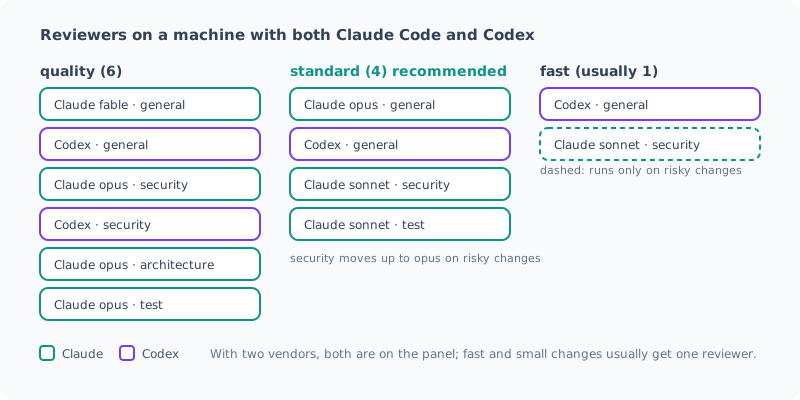
quality: 6 reviewers. The architecture angle, which checks whether the design makes sense, is added, and Codex takes 2 seatsstandard: 4 reviewers. Both vendors cover general review, and security and test are added on lighter modelsfast: normally 1 reviewer. The security reviewer runs only for risky changes
In every preset, if both vendors are installed, the panel includes both. However, in fast only Codex’s general reviewer normally runs, and Claude’s security reviewer runs only for risky changes. Also, in standard and fast, a small, low-risk change gets 1 reviewer (general). It is not always reviewed by both vendors.
3. Compare the number of reviewers per environment
The number of reviewers also changes with the installed CLIs.
| Environment | quality | standard | fast |
|---|---|---|---|
| Claude Code and Codex | 6 | 4 | 1 (+1 when risky) |
| Claude Code only | 4 | 4 | 1 (+1 when risky) |
| Codex only | 4 | 2 | 1 (+1 when risky) |
standard has only 2 with Codex alone because, as I wrote in the Codex post, it does not create seats that line up the same AI in the same role, or seats meant for a cheaper model.
With Claude Code only, the reviewer that normally runs in
fastis general on opus. The architect is also opus, so it does not run on light models alone.
4. Compare design review and optimization level
The remaining two.
quality | standard | fast | |
|---|---|---|---|
| Design review | Decided automatically | Decided automatically | Off |
| Optimization level | quality | balanced | aggressive |
Design review is the step that reviews the plan itself before implementation starts. “Decided automatically” means it runs only when the plan is large or risky. fast skips it.
Optimization level is a dial for how far the review cuts cost.
aggressive | balanced | quality | |
|---|---|---|---|
| Tests are failing | No review | No review | Review anyway |
| Small, low-risk change | 1 reviewer | 1 reviewer | All reviewers |
| Findings asked of each reviewer | 4 | 6 | 10 |
Changes that touch authentication, secrets, payments, migrations and the like have their optimization level raised to
qualityin every preset. The preset itself does not change. All of that preset’s reviewers (2 forfast) review it, up to the maximum number of findings.
In every preset, implementation does not start until you approve the plan.
5. Which one to pick
| Situation | Recommendation |
|---|---|
| Just getting started, everyday development | standard |
| Lots of code where mistakes are costly, like auth or payments, and you have tokens to spare | quality |
| Mostly small fixes, prototyping, or you want to save tokens | fast |
If unsure, leaving it at standard is fine. Move up if it feels insufficient, move down if it feels heavy.
6. Switch presets
Ask the agent “switch the dev-orchestra preset to fast” and it switches for you. Under the hood, it runs these commands.
dev-orchestra config setup --preset quality   # save the preset (nothing is asked)
dev-orchestra config set preset fast          # switch while keeping the other settings
The preset is saved in the global config as a single key (such as preset: fast). Only the name is saved; the contents are expanded to match the machine’s CLIs each time they are loaded. If you install Codex later, Codex joins the review automatically from the next run.
Summary
- A preset is a choice of “where to spend your money.” It decides the model per role, the reviewers, design review, and the optimization level together
- If unsure, pick
standard. It uses a strong model for design, and reviews with both vendors qualityhas up to 6 reviewers;fastnormally has 1- It is rearranged automatically to match the installed CLIs. With both vendors, every preset’s panel includes both (but
fastand small changes are normally reviewed by one reviewer) - Risky changes have their optimization level raised to
qualityand are reviewed by all of that preset’s reviewers (2 forfast) - To switch, run
config set preset <name>or just ask the agent
The detailed preset rules are in the configuration docs.
After choosing a preset, if you want to add specialist reviewers suited to your repository (database, frontend, etc.), config suggest-roles will suggest them. Next time, I will write about those reviewers and how to rearrange roles.
All posts in this series are in the list of “dev-orchestra” posts.
GitHub: istb16/dev-orchestra (a star is always appreciated)
Related Posts
I Measured dev-orchestra: Time per Request, and Findings by Number of Reviewers
With dev-orchestra 1.2.1, I made one small feature request and measured how long it took (about 6 minutes, not counting my approval) and how many findings were reported and accepted with 1, 2, and 4 reviewers. More reviewers meant more accepted findings, but the extra ones were about tests.
Giving dev-orchestra Standing Instructions per Role
I tried instructions, added in dev-orchestra 1.2.1. Standing instructions for the implementer or reviewers written in the repository go into every prompt. I check, with real output, how they are shown, where they go, and how a change to the instructions is treated.
Rearranging dev-orchestra's Reviewers and Roles
How to set the model for each role in dev-orchestra, how to choose reviewer focuses, and config suggest-roles, which proposes domain specialists. I also showed a change with deliberately planted bugs to 9 reviewers to see what changes as you add more of them.