Running Multiple AI Reviews by Hand Was Too Tedious, So I Built a Plugin That Automates It
Introduction
I built a plugin for Claude Code / Codex called dev-orchestra and released 1.0.0.
You make a one-sentence request, and it runs design → implementation → testing → independent reviews by multiple AIs → sorting the findings → fixes → re-testing, in order.
I’ll leave the detailed explanation of what it can do to the next post. Here I’ll write about why I built it and how it went once I built and used it.
dev-orchestra is public on GitHub (MIT license). If it looks useful to you, I’d be happy if you gave it a star.
Before: I Had Become the Courier
Ever since I started having AI write code, one thing had bothered me. AI is bad at reviewing code it wrote itself. When it reviews, it still holds the same assumptions that produced the bug.
So I had started having a different AI review the code too. Here’s what I was doing:
- Have the agent in terminal A implement it
- Copy the diff and ask the agents in terminals B and C to review it
- Wait for them to finish
- Copy the results back to terminal A and have it fix things
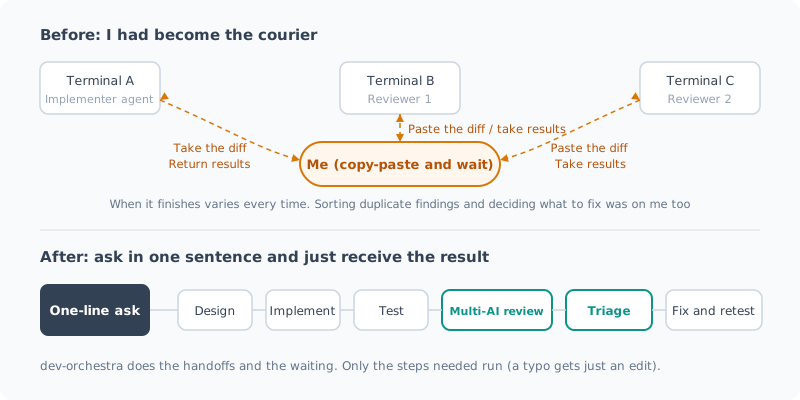
This turned out to be more tedious than I’d imagined.
- When it finishes is different every time. Sometimes it comes back in tens of seconds, sometimes it takes several minutes. In the meantime, all I can do is wait
- The more reviewers I add, the more copy-paste round trips there are
- The findings that come back are duplicated or off the mark. I have to sort out which ones to fix myself before passing them back
In other words, I was supposed to be having AI do the work, yet I had become the courier between AIs.
Was Showing It to Another AI Worth It?
I kept at it despite the effort because it felt like it was paying off.
I checked it with numbers a little later. Once the early version of dev-orchestra was ready, I wrote up a run with it in an earlier post. I had three AIs review a script I had written and was running myself (1418 lines), and they found 11 real bugs. Three of them were ones I would almost certainly never have noticed myself.
That said, this is the result of a single run. The third reviewer (a local LLM) hit only 1 of 6, and there were also defects all three missed. Showing code to several AIs doesn’t make it perfect.
Even so, it was clearly better than “have one AI write it and call it done”. The problem wasn’t the effect; it was the effort.
What I Built: dev-orchestra
So I made it possible to hand off the courier job entirely. You just talk to your agent as usual.
この issue を設定済みのワークフローで実装してdev-orchestra then picks only the steps the request needs and runs them in order.
| Step | What it does |
|---|---|
| Design | Investigates and writes a plan. It doesn’t move on to implementation until you approve |
| Implementation | Writes code and tests from the plan |
| Review | Two or more AIs read the same diff without seeing each other’s results |
| Triage | Merges duplicates and sorts out which findings are real |
| Fix | Fixes only the accepted findings and re-runs the tests |
A typo fix gets just an edit, a spec change gets everything: the steps change with the size of the request.
What Worked Well
1. Triage strikes the right balance
This was what helped most.
When multiple AIs review code, the findings overlap, and some are off the mark. Pass all of them along with “fix these” and you get a pile of unnecessary changes.
dev-orchestra mechanically merges duplicate findings, then the orchestrator AI sorts them into accepted, rejected, and duplicate. Only the accepted findings reach the fixer. This sorting lands at just the right balance, feeling almost the same as doing it myself.
2. Implementation got more accurate
I didn’t measure and compare this; it’s my impression. Since I started running design, implementation and review as separate steps, I feel implementations mostly come out as intended.
For example, even for a request that was only to write test code, the result was better after going through the review and fix steps.
What I Rebuilt in Three Weeks of Actual Work
I released 0.1.0 on 9/10 and 1.0.0 on 10/12. That’s about a month, but I actually worked on it for about three weeks. In that time I cut around 30 versions. That’s the result of fixing “this is a problem” as I used it. Here are the ones that stuck with me.
| What I rebuilt | Why |
|---|---|
| Don’t guess model names | Prevents thinking it ran when it used a model name that doesn’t exist. The config holds only the family name and “latest” |
| Freeze the diff under review | If everyone isn’t looking at the same thing, you can’t compare the findings |
| The second review covers only the fixes | Showing everything again each time doubles both the time and the tokens |
| Fewer reviewers for small changes | Three reviewers for a typo is a waste |
| Wait for plan approval | If design drifts and it runs all the way through implementation, the redo is large |
| Enforce read-only in the CLI | Just asking “don’t modify anything” was sometimes not respected |
The Problem: Tokens Run Out Fast
The biggest problem while building it was that every run costs money (tokens).
Because it runs multiple AIs through the real CLIs, tokens drain fast even when I only meant to run a test. I hit the limit several times and work stopped.
So I gradually added mechanisms to avoid calling AIs needlessly, like “the second review covers only the fixes” and “fewer reviewers for small changes” in the table above.
Still, I don’t think it’s enough yet. Making token use more efficient is the biggest challenge after 1.0.0.
Give It a Try If You Like
In Claude Code, it installs with two lines.
claude plugin marketplace add istb16/dev-orchestra
claude plugin install dev-orchestra@dev-orchestra
It works with Codex too. What it can do and the setups you can use it with are covered in the introduction post.
Because it runs multiple AIs, it uses more tokens than getting by with a single AI. I recommend starting with small requests.
Summary
- Having another AI review code an AI wrote finds bugs you wouldn’t notice yourself
- But by hand, copy-pasting between terminals and waiting turned me into the courier
- dev-orchestra is what lets me hand that off. A one-sentence request runs everything from design to review and fixes
- What worked well: triage strikes the right balance, and I felt implementation (even just tests) got more accurate (my impression)
- The problem: token consumption. Efficiency is the challenge after 1.0.0
- 1.0.0 in about three weeks of actual work. Give it a try if you like
All posts in this series are in the list of “dev-orchestra” posts.
GitHub: istb16/dev-orchestra (a star would be very encouraging)
Related Posts
I Measured dev-orchestra: Time per Request, and Findings by Number of Reviewers
With dev-orchestra 1.2.1, I made one small feature request and measured how long it took (about 6 minutes, not counting my approval) and how many findings were reported and accepted with 1, 2, and 4 reviewers. More reviewers meant more accepted findings, but the extra ones were about tests.
Giving dev-orchestra Standing Instructions per Role
I tried instructions, added in dev-orchestra 1.2.1. Standing instructions for the implementer or reviewers written in the repository go into every prompt. I check, with real output, how they are shown, where they go, and how a change to the instructions is treated.
Rearranging dev-orchestra's Reviewers and Roles
How to set the model for each role in dev-orchestra, how to choose reviewer focuses, and config suggest-roles, which proposes domain specialists. I also showed a change with deliberately planted bugs to 9 reviewers to see what changes as you add more of them.