I Released dev-orchestra: Design, Implementation, and Multi-AI Review from a Single Request
Introduction
Last time, I wrote about why I built dev-orchestra. This time I’ll introduce what it does and who it’s for.
- GitHub: istb16/dev-orchestra (MIT, 1.0.0)
- Where it runs: as a plugin for Claude Code / Codex / Antigravity
Later in this series, I’ll cover how to use it in Claude Code, Codex, and Antigravity, and go into the configuration in detail. This post is the entry point.
dev-orchestra is open source on GitHub (MIT license). If it looks useful, a star would mean a lot.
In a Nutshell
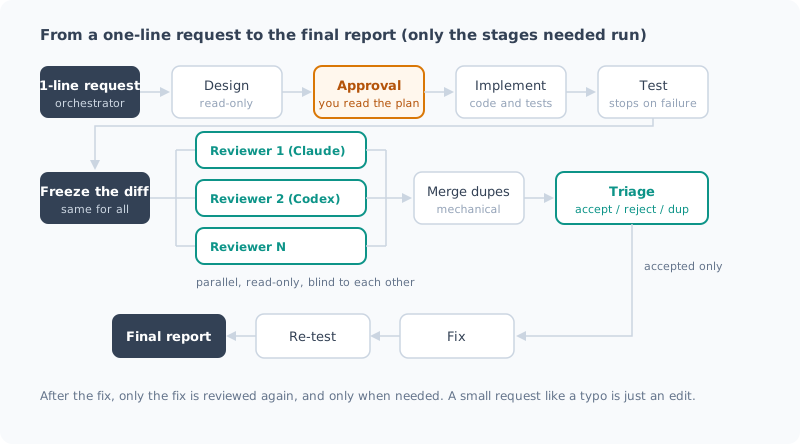
It’s a plugin that takes a single-sentence request and runs design → implementation → testing → independent reviews by multiple AIs → triage of the findings → fixes → re-testing.
Implement this issue with the configured workflowSay that, and dev-orchestra picks only the steps the request needs and hands them to the AIs in order.
| Step | Role | Key point |
|---|---|---|
| Design | architect | Investigates and writes a plan. Read-only, and doesn’t move on to implementation until you approve |
| Implementation | implementer | Writes code and tests from the plan |
| Review | reviewers | Two or more AIs read the same frozen diff without seeing each other’s results |
| Triage | orchestrator | Merges duplicates and sorts findings into accepted, rejected, and duplicate |
| Fix | review_fixer | Fixes only the accepted findings |
A typo fix gets just an edit, a schema change gets everything: which steps run depends on the size of the request.
Why Have a Different AI Review the Code?
AI is bad at reviewing code it wrote itself. The assumptions that produced the bug are still there when it reviews.
Separate AIs looking at the same diff without knowing each other’s opinions sometimes disagree. That disagreement is where the real bugs are.
Another important point is not passing review results straight to the fixer. Findings from multiple AIs overlap, and some miss the mark. Hand all of them over with “fix these,” and you get a pile of unnecessary changes. So dev-orchestra mechanically merges the findings, triages them, and passes only the accepted ones to the fixer.
How It Differs from the Official codex-plugin-cc
If all you want is “have Codex review from Claude Code,” there’s OpenAI’s official codex-plugin-cc. It wins on ease of use, so here’s an honest comparison.
| codex-plugin-cc | dev-orchestra | |
|---|---|---|
| Provided by | OpenAI (official) | Individual OSS |
| Runs on | Claude Code | Claude Code / Codex / Antigravity |
| Reviewing AI | Codex | Two or more in parallel (Claude / Codex / custom. Antigravity has limited support) |
| Scope | Review, and delegating tasks to Codex | End to end, from design through review, fixes, and re-testing |
| Handling findings | Returns results to Claude Code. With the optional review gate enabled, Claude has to address any problems | Merge duplicates → triage → fix only the accepted ones |
| Getting started | Ready to use via slash commands | Pick a preset first |
| Handy features | Background runs, adversarial reviews with a focus you specify, handing the conversation off to Codex | Plan approval, a cap on review rounds, token logging |
The official plugin’s review gate can be enabled with /codex:setup --enable-review-gate.
When Claude is about to finish its response, Codex reviews it, and if it finds problems, it blocks the finish and makes Claude fix them first. If you just want automatic review and fixes, this is enough.
The README warns that the review gate can keep looping and use up your usage limits.
The difference is the number of reviewers and how findings are handled. The review gate has a single reviewer, Codex. dev-orchestra cross-checks findings from multiple reviewers, merges duplicates, triages them, and fixes only the accepted ones.
Here’s a rough guide for choosing:
- You want to add one Codex second opinion to your Claude Code work → codex-plugin-cc
- You want to run the whole development flow with multiple AIs → dev-orchestra
Supported CLIs
dev-orchestra uses the AI CLIs you already have installed. No API keys are needed (it uses each CLI’s login).
| Claude Code | Codex | Antigravity | |
|---|---|---|---|
| Install as a plugin | Yes | Yes | Yes (installed via a link, restart required) |
| Implementation / fix roles | Yes | Yes | Yes (running tests needs configuration) |
| Design / review roles | Yes read-only enforced by the CLI | Yes read-only sandbox | Partly read-only can’t be enforced, so limited support with a warning |
| Resume from where design left off | Yes | Yes | No |
Claude Code and Codex can handle every role. Antigravity is meant for implementation and fixes; you can put it in design or review, but it will run with the ability to modify files. I’ll cover the differences in detail in the post on each tool.
Is It Worth Using with Claude Code Alone?
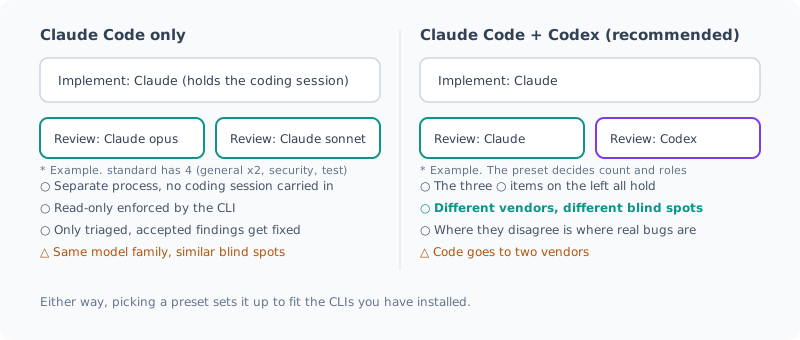
“Multiple AIs” might sound irrelevant if you only use Claude Code. But it’s worth using even with Claude Code alone.
| What you get even with Claude Code alone | Why it helps |
|---|---|
| Reviewers run in a separate process and don’t carry over the conversation from implementation | They read the code without the premise of “I decided this myself a moment ago” |
| The CLI enforces read-only | Just asking “don’t modify anything” isn’t always respected |
| You can assign a different model to each role | Spend where it matters: a strong model for design, a lighter one for reviews you want to keep cheap |
| Triage means only accepted findings get fixed | No unnecessary fixes slip in |
Only the needed steps run, and records are kept in .ai/ | Small requests stay light, and for big ones you can reread the plan and reviews later |
When you pick a preset, the setup is decided based on the CLIs installed on that machine. If only Claude Code is installed, the reviewers are all Claude too.
That said, it works best when you mix in an AI from a different vendor. Models from the same family tend to share the same assumptions. If you can also use Codex, I recommend trying a two-vendor setup.
Pros and Cons
| Pros | Cons |
|---|---|
| Finds bugs you wouldn’t notice yourself | More run time and token usage (because it calls AIs many times) |
| No more courier work (copy-pasting and waiting) | Findings still need triage (the orchestrator does it, but you do the final check) |
| No unnecessary fixes slip in | Code the reviewers read is sent to each vendor you registered (not necessarily just the diff) |
| Plans and reviews are kept on record | Some setup effort, such as picking a preset first |
Keep the third con in mind in particular. If you review with Claude and Codex, your code is sent to both Anthropic and OpenAI.
It’s not just the diff. To investigate around the diff, reviewers can read files in the repository. Even in read-only mode, both Claude and Codex can read files like .env. On top of that, with Claude, the permissions.deny rules you wrote don’t apply to reviewers either. I’ll cover why and what to do about it (move the rules to managed settings) in the upcoming Claude Code post.
If you work with code that can’t leave your environment, you can also set up reviews with local LLMs only.
In that case, though, don’t call dev-orchestra from a cloud AI such as Claude Code. The calling AI reads the code itself, so the code goes out to the cloud from there. Run it directly from the terminal and use --only to limit the reviewers to local LLMs. I wrote about this in detail in an earlier post.
There are mechanisms to keep token usage down (fewer reviewers for small changes, re-reviewing only the fixes the second time, and so on), but it will definitely use more than getting by with a single AI. I recommend starting with small requests.
Usage
On Claude Code, installation takes two lines.
claude plugin marketplace add istb16/dev-orchestra
claude plugin install dev-orchestra@dev-orchestra
How to install on Codex and Antigravity, initial setup, and each command are documented on GitHub. That’s the source of truth for the latest information.
- README — installation, initial setup, usage
- Workflow — what each step does, example workflows
- Configuration — presets, models, how to set up reviewers
Summary
- dev-orchestra is a plugin that runs design, implementation, multi-AI review, and fixes from a single-sentence request
- Reviewers read the same frozen diff, read-only, without seeing each other. Findings are triaged, and only the accepted ones are fixed
- To add one Codex second opinion, use the official codex-plugin-cc; to run the whole development flow, use dev-orchestra
- Claude Code and Codex handle every role; Antigravity is meant for implementation and fixes (limited support for design and review)
- Even with Claude Code alone, separate-process reviews and triage make it worthwhile. It works best when you mix in a different vendor
- The downsides are time and tokens, and your code being sent to each vendor. Reviewers can read files beyond the diff
- For confidential code, review with local LLMs only, directly from the terminal
Starting next time, I’ll actually use it in Claude Code, Codex, and Antigravity.
All posts in this series are in the list of “dev-orchestra” posts.
GitHub: istb16/dev-orchestra (a star is always appreciated)
Related Posts
I Measured dev-orchestra: Time per Request, and Findings by Number of Reviewers
With dev-orchestra 1.2.1, I made one small feature request and measured how long it took (about 6 minutes, not counting my approval) and how many findings were reported and accepted with 1, 2, and 4 reviewers. More reviewers meant more accepted findings, but the extra ones were about tests.
Giving dev-orchestra Standing Instructions per Role
I tried instructions, added in dev-orchestra 1.2.1. Standing instructions for the implementer or reviewers written in the repository go into every prompt. I check, with real output, how they are shown, where they go, and how a change to the instructions is treated.
Rearranging dev-orchestra's Reviewers and Roles
How to set the model for each role in dev-orchestra, how to choose reviewer focuses, and config suggest-roles, which proposes domain specialists. I also showed a change with deliberately planted bugs to 9 reviewers to see what changes as you add more of them.